
A drone turns physics from an abstract equation into a visible flight path. Well-designed drone lesson plans for physics class connect concepts such as force, motion, and energy to practical challenges, while building skills in measurement, problem-solving, and responsible flight. In the United States, applicants must be at least 16 years old to qualify for an FAA remote pilot certificate under Part 107, according to the Federal Aviation Administration.
Students need clear instruction and meaningful practice to connect classroom concepts with real-world drone use. Activities that ask them to predict, observe, and explain flight can make physics more engaging and show how STEM skills apply beyond the classroom.
This guide explores how to build standards-aligned drone lessons, introduce Part 107 concepts, and use problem-based scenarios that bring physics into focus. You’ll also find practical tools and resources for adapting activities to your classroom, supporting educator preparation, and helping students explore pathways into the UAS field.
Key Takeaways
- Connect drone activities to physics concepts such as forces and motion so students can observe ideas in action.
- Align lesson goals, activities, and assessments to give drone learning a clear place in the curriculum.
- Use real-world scenarios to help students apply physics concepts while exploring responsible drone operations.
- Adapt free lesson resources to your students’ grade level and classroom objectives.
- Use simulation and educator training to build confidence before bringing hands-on drone activities into class.
Why Should Students Learn To Use Drones?
Drones make physics observable. Students can connect thrust, drag, lift, and gravity to a real aircraft’s movement, then use evidence from flight practice to explain what happened. They also encounter aviation terms that give classroom concepts practical meaning. In the United States, applicants must be at least 16 years old to qualify for an FAA remote pilot certificate under Part 107, according to the Federal Aviation Administration.
Begin with the controls and how the aircraft responds. Pitch tilts a drone forward or backward; roll tilts it side to side; yaw turns its nose left or right. Students can predict a movement, test the control, and record whether the drone follows the expected path. This sequence builds skills in observation, measurement, and evidence-based problem-solving.
Flight planning brings geometry into the lesson. Have students sketch a route between marked points, estimate its length using a map scale, and calculate the drone’s horizontal travel distance. They can use trigonometry to relate a viewing angle to an object’s height or distance, then compare their estimate with observations. A grid map, ruler, and calculator make the route and calculations clear before a flight.
Start a beginner mission with a clear objective, such as moving between marked locations or holding position over a target. Students can plan the route, identify launch and landing points, and assign roles for pilot, observer, and recorder. A block-based programming tool can help them arrange commands for takeoff, movement, pauses, and landing. Use a flight-planning map to sketch the route and a simulator to rehearse commands and control inputs before flying.
Flight operations also offer a structured way to think through unexpected events. Ask teams to pause a mission when they encounter a simulated obstacle, lose visual orientation, or need to change the planned route. Students should describe what changed, choose a safe response within the lesson’s procedures, and explain how that decision affects the mission. The goal is deliberate decision-making, not speed.
Drone lessons differ from simulations and paper activities because students can connect predicted movement with an actual flight. Simulations offer repeatable practice without a physical aircraft, while paper tasks let students focus on route calculations and planning.
A classroom lesson may use a drone, its required power supplies, route markers, a measuring tool, and a calculator; a simulator or coding tool can support preparation. One school’s technical education department purchased 20 beginner drones for $100 apiece, offering a concrete example rather than a universal classroom budget.
Assess learning through a route plan, a prediction, flight observations, and a short explanation linking results to forces or motion. A rubric can assess calculation accuracy, reasoning behind control choices, and how clearly students use evidence to explain the outcome.
Developing a standards-aligned drone curriculum
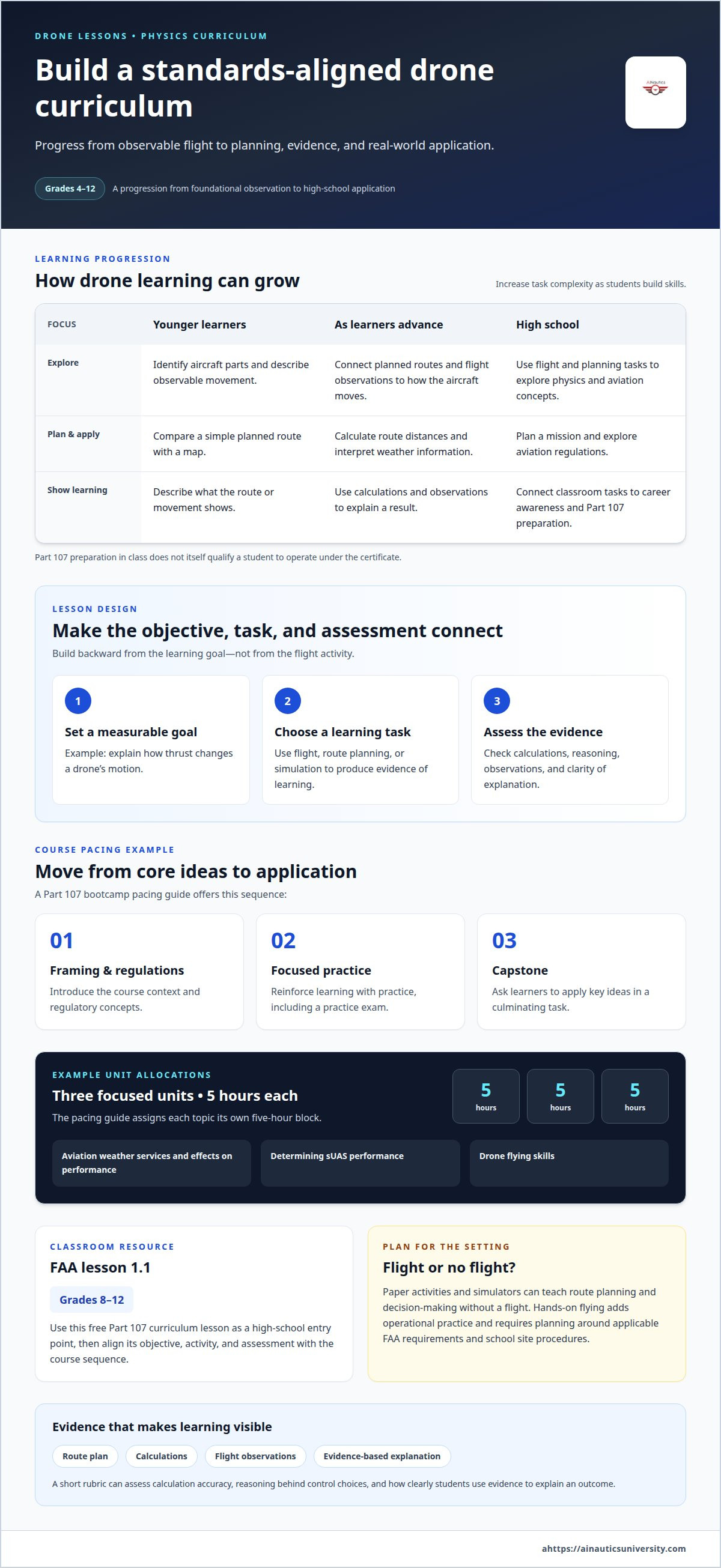
Build the curriculum backward from the learning goal. For a physics unit, start with a measurable outcome, such as explaining how thrust changes a drone’s motion. Then choose a flight, planning, or simulation activity that produces evidence of learning. A lesson plan should connect the objective, student task, and assessment, rather than treating drone flying as a standalone reward.
A progressive sequence can serve grades 4-12 by increasing the complexity of the task. Younger learners can identify aircraft parts, compare a planned route with a simple map, and describe observable movement. As students advance, they can calculate route distances, interpret weather information, plan a mission, and explore aviation regulations. In high school, connect these tasks to career awareness and Part 107 preparation without suggesting that a classroom course itself qualifies a student to operate under the certificate.
For standards alignment, map each activity to the science or math skill it teaches. A route-planning lesson can assess scale, distance, and geometry; a flight observation can assess evidence-based explanations of motion. Add a short rubric covering calculations, use of observations, and clarity of explanations. A spreadsheet can organize student results, while a route map supports spatial reasoning. These tools make the connection between curriculum objectives and student work visible.
Course pacing should move from concepts to application. The FAA Part 107 bootcamp pacing guide sequences instruction from framing and regulations through a practice exam and capstone. That sequence offers a useful model for organizing instruction: introduce key ideas, reinforce them with focused practice, then ask students to apply them in a culminating task. In the drone course curriculum, aviation weather services and effects on performance, determining sUAS performance, and drone flying skills are each allotted 5 hours. Teachers can use these units to plan focused instruction without trying to cover every concept in one lesson.
For a school lesson involving an actual flight, plan around applicable FAA operating requirements and the school’s site procedures. A paper activity or simulator can teach route planning and decision-making without a flight; hands-on flying adds operational practice and requires separate planning.
A free FAA Part 107 drone curriculum lesson 1.1 is listed for grades 8 through 12. Use it as a high-school entry point, then align its objective, student activity, and assessment with the course sequence. A simulator can help students rehearse planned tasks before a physical flight, while a lesson-planning template helps educators document standards, materials, and evidence of learning.
Problem-based learning with real-world scenarios
Give students a problem before introducing the drone task. For example, a parks team needs to document storm damage across a model trail. Students define what information would help, choose a collection plan, and explain how their evidence supports a recommendation. The scenario brings engineering, science, and communication together around a purpose beyond operating an aircraft.
Structure the activity as a cycle: define the need, identify constraints, plan, test, and explain. In the storm-damage scenario, groups might decide which features a simulated aerial survey should capture. A map helps teams mark areas of interest, while scenario cards introduce constraints such as limited visibility or an inaccessible section. Students then explain how each constraint affects their plan.
Use a simulator or tabletop map when the lesson focuses on decisions rather than physical flight. A simulator lets students rehearse a mission and compare options; a paper map supports route sketches and team discussion. A shared spreadsheet can organize observations from each simulated pass. These tools connect science reasoning to a practical engineering process without requiring a single correct answer.
The FAA Part 107 teacher onboarding guide describes a five-day plan that includes a real-world scenario debate on day five. A classroom can adapt that structure by building toward a final debate. Teams present a proposed drone-based response, explain what data they would collect, and defend their choices against questions from classmates. The debate turns planning into evidence-based communication.
Assess the thinking, not just the final mission. Use a rubric to evaluate how clearly each group defines the problem, supports its plan with observations, and responds to changing conditions. A flight log or simulation record gives students concrete evidence to cite. After the activity, ask each team to name an assumption they changed and a piece of evidence that influenced its decision.
Real-world scenarios also introduce students to careers connected with UAS, including roles involving planning, data interpretation, and technical communication. Keep the scenario grounded: a simulated site survey can prompt questions about what information decision-makers need, how teams organize findings, and how they communicate limitations. Students learn that a drone mission is part of a broader problem-solving process.
Prepare the class with a short scenario brief, a map or simulator, a team worksheet, and a presentation rubric. Assign roles such as planner, data recorder, and presenter so everyone contributes. Conclude with a reflection connecting the team’s choices to science concepts and engineering trade-offs. This focused activity gives students practice in reasoning, collaboration, and clear explanation.
What are free drone lesson plans for high school physics?
Free drone lesson plans give teachers a structured way to connect flight activities with physics objectives. A strong plan names the concept, outlines the student task, and explains what evidence demonstrates learning. For example, students can predict how a drone will move, observe a flight or simulation, and explain the result using forces. Free materials can reduce preparation time, but teachers still need to match each activity to course goals.
Start by choosing one physics concept. A motion lesson might ask students to compare a planned route with observed movement. A forces lesson could have them explain how thrust relates to lift-off and hovering. A graphing activity can use a flight log to organize observations over time. Keep the task focused so students spend their effort interpreting evidence rather than juggling unrelated concepts.
A free learn-to-fly drone lesson is described as the first day of a 30-day curriculum. That makes it a possible entry point for a longer sequence, rather than a complete physics unit by itself. Teachers can build on the introduction with lessons on measurement, motion, and data interpretation. A lesson-planning template helps connect each activity to a learning objective and assessment.
Several classroom tools support free lesson activities. Graph paper helps students map routes and sketch motion. A spreadsheet organizes measurements and makes patterns easier to compare. A flight simulator lets students rehearse a scenario and repeat observations without a physical drone. A calculator supports distance or rate calculations when they fit the lesson’s math objectives.
Before using a free plan, review its target grade, required materials, teaching steps, and assessment method. Then adapt the task to your class. If the lesson assumes physical flight, use a simulator or paper route to preserve the planning objective. If the activity centers on data, provide a sample flight log for analysis. These changes keep the physics question intact while fitting available classroom resources.
Close the lesson with a student explanation, not just a completed flight. Ask learners to state their prediction, cite an observation, and connect the evidence to a physics concept. A short rubric can assess explanation accuracy, use of data, and clarity of reasoning. This helps teachers see whether the activity taught physics, not just drone controls.
Free plans work best as adaptable starting points. Select one objective, prepare the needed map, log, or simulator, and decide in advance what student evidence will count. Then adjust the next lesson based on the explanations students produce. This approach turns an introductory activity into purposeful physics learning without requiring every class to begin with hands-on flight.
What hands-on drone experiments teach forces and motion?
A controlled flight lets students observe forces in action. During a hover, they can describe how the drone maintains its position while gravity pulls downward. In forward flight, students can compare the direction of motion with the drone’s tilt and discuss how changing thrust affects acceleration. A flight log helps them connect each observation to a physics explanation.
Start with a prediction, then test it. Students can mark a straight route on the floor, predict how the drone will move, and record its path from a safe viewing position. A measuring tape provides distance data, while a stopwatch helps students compare movement over time. They can plot observations on graph paper and explain where the drone accelerated or maintained a steady pace.
To explore force and direction, ask students to compare forward, sideways, and turning movements. Have them draw arrows to represent the direction of motion and the forces they think affect it. A whiteboard makes it easy to compare diagrams across groups. Students can revise their force models after watching a flight, then explain how the evidence supports or challenges their initial prediction.
- Hover and gravity: Record what stays constant and discuss how upward thrust balances the downward pull of gravity.
- Forward movement: Track a planned path and connect the drone’s tilt with its change in direction.
- Turning: Observe a controlled turn and draw a force diagram showing the change in motion.
Keep the experiment focused by changing one factor at a time. For example, compare two planned routes while keeping the observation method the same. A spreadsheet can organize each group’s distance and time records, making patterns easier to discuss. Students should distinguish observations from inferences, especially when explaining acceleration or drag.
A flight simulator supports repeatable practice when the activity does not include a physical flight. Students can repeat the same movement, pause to inspect a path, and compare observations across attempts. For hands-on work, a classroom flight log captures the route, control input, and student explanation. These tools help teachers assess conceptual understanding and the quality of evidence.
Close with a short claim-evidence-reasoning response. Each student states which force or motion concept the experiment demonstrates, cites an observation, and explains the connection. For instance, a student might use a recorded route to explain how a change in direction differs from steady motion. This final step makes the physics visible in students’ thinking, not just in the drone’s flight.
AINautics University: Drone Simulator
AINautics University offers a Drone Simulator for educators who want students to practice flight decisions in a simulated setting. It can support lessons on forces and motion by letting students rehearse a planned movement and discuss their observations. Use it alongside classroom instruction as students apply physics concepts to drone activities.
Educators developing a broader UAS course can explore the Train-the-Teacher Program. Part 107 Training and Self-Paced Certification options support learners preparing for certification. The VR Trailer Mobile Lab and UAS Student Scholars program offer further educational resources. Choose the option that fits your teaching or learning goal.
Contact AINautics University to discuss which offering best fits your goals.
Turn classroom ideas into your next learning step
Choose one physics objective, then shape a class activity around the evidence students will produce. A focused start can turn drone lesson plans for physics class into a pathway for inquiry, technical confidence, and further UAS learning.
AINautics University supports educators with a Train-the-Teacher Program and VR Trailer Mobile Lab. Students can explore Part 107 Training, Self-Paced Certification options, and the UAS Student Scholars program as next steps in aviation learning.
Consider your classroom or learning goals, then contact AINautics University to discuss educational options. Keep the next step manageable, stay curious, and help students connect physics with technologies shaping future careers.
Frequently Asked Questions
What physics concepts can drone lesson plans teach?
Drone lessons can explore Newton’s laws, energy transfer, vectors, and measurement. For example, students can diagram how a drone’s direction changes when its thrust changes, or compare the electrical energy stored in a battery with motion during flight. A data table can connect observations to predictions. Teachers can extend the activity by asking students to identify which variables stayed constant and which changed.
Are there middle school drone physics lesson plans?
Yes. Middle school students can explore drone physics through simplified investigations focused on observation and clear explanations. For example, have learners predict how changing a route affects distance traveled, then compare a map with a recorded path. A diagram or vocabulary card can support students new to aviation terms. Keep calculations manageable and ask students to explain their reasoning in their own words.
How can students calculate a drone's speed, acceleration, and flight time?
Students calculate average speed by dividing distance traveled by elapsed time. Students can explore acceleration by comparing changes in speed over time. For flight time, subtract the recorded takeoff time from the landing time. A stopwatch, flight log, and calculator support the work. Students should record units consistently, such as meters and seconds, to keep calculations and comparisons clear.
What safety precautions should teachers use for classroom drone activities?
Before a flight, mark a clear operating area, keep observers outside it, and assign one person to manage the controls. Review the activity’s stop signal and landing procedure before students begin. Check that the space is clear of people and obstacles, and pause if conditions change. A simulator or paper-based task can keep the lesson active when a physical flight is not appropriate.
How can drone lessons be adapted for different grade levels and class lengths?
Adjust the task’s complexity, not its central learning goal. Younger learners can sort flight observations into categories, while older students can calculate rates or justify a route choice with data. For a shorter class, focus on one prediction and one explanation; a longer period can include another test and reflection. A reusable worksheet helps maintain continuity across lessons and grade levels.

Article by
AINautics University Team
The team behind AINautics University, dedicated to drone education and FAA Part 107 certification prep, VR flight simulation, and STEM training programs for students and educators.


