
A line of code becomes easier to understand when students can watch a drone respond. Teaching coding with programmable drones can move learners from visual block commands toward Python, while giving them a practical way to explore sequencing, movement, and debugging.
It makes sense to want more than a screen-based lesson: students can see how their instructions shape a flight path. Teaching coding with programmable drones works best when skills build in stages, starting with simple commands and using simulation to test and refine ideas before a drone takes flight.
This guide explains how to match educational drone programming capabilities to classroom goals, introduce block coding and Python, and connect programming concepts to hands-on flight activities. It also covers safety, simulation, and teacher preparation, helping educators structure lessons that encourage experimentation.
Key Takeaways
- Build lessons around student inquiry, safe flight practices, and backup activities for technology interruptions.
- Use simulation to test routes, spot coding errors, and refine flight plans before live practice.
- Choose an educational drone whose programming features and durability support your curriculum goals.
- Start with visual coding, then introduce Python as students gain confidence with sequencing, loops, and variables.
- Strengthen classroom delivery with educator training and tools such as AINautics University’s Train-the-Teacher Program.
Classroom drone curriculum and teacher support
Keep students clear of the flying area while a drone operates. Before a flight, explain safe handling and choose an open space without obstacles or hazards. These classroom rules set clear boundaries for observing and testing code.
Build the curriculum around a question students can investigate, such as how changing a command changes a drone’s path. Rather than relying only on direct instruction, guide learners to predict, test, observe, and explain. For example, students can plan a geometric route, run the code, and compare the drone’s movement with their prediction.
Connect each flight task to a learning goal. A route involving turns and specific distances can bring coding, geometry, and flight concepts together. Ask students how the order of commands affects the route, then have them revise one instruction and explain the result. The drone’s immediate response makes the effect of a coding decision visible.
Use a simple lesson sequence to keep inquiry focused:
- Introduce the challenge: Set a goal, such as planning a route around a marked area.
- Plan: Have students sketch the path and identify the commands they expect to use.
- Test: Run the program in a safe, open flight area while students remain clear of the operating space.
- Reflect: Compare the planned route with the flight and identify one change to test.
Plan for interruptions before a coding activity begins. A drone, battery, or software issue can disrupt a flight task, so prepare a troubleshooting plan and a backup activity. If the drone cannot fly, students can inspect the command sequence, predict the intended route, or map it on paper. These alternatives keep the learning goal in focus without requiring flight.
Teacher preparation matters because classroom integration involves both technology and instruction. Training focused on drone technology, coding, and classroom integration can help educators prepare lessons and guide student experimentation. Rehearse the activity, anticipate where students may need help, and decide how to proceed if the flight or software fails.
Drone coding can also connect classroom projects to future study. Software development, robotics, data science, and artificial intelligence are technology career paths where coding knowledge can be useful. Examples from agriculture, filmmaking, construction, emergency response, infrastructure inspection, and environmental research can help students see how drone systems apply beyond a classroom route.
Drone coding simulation and pre-flight testing
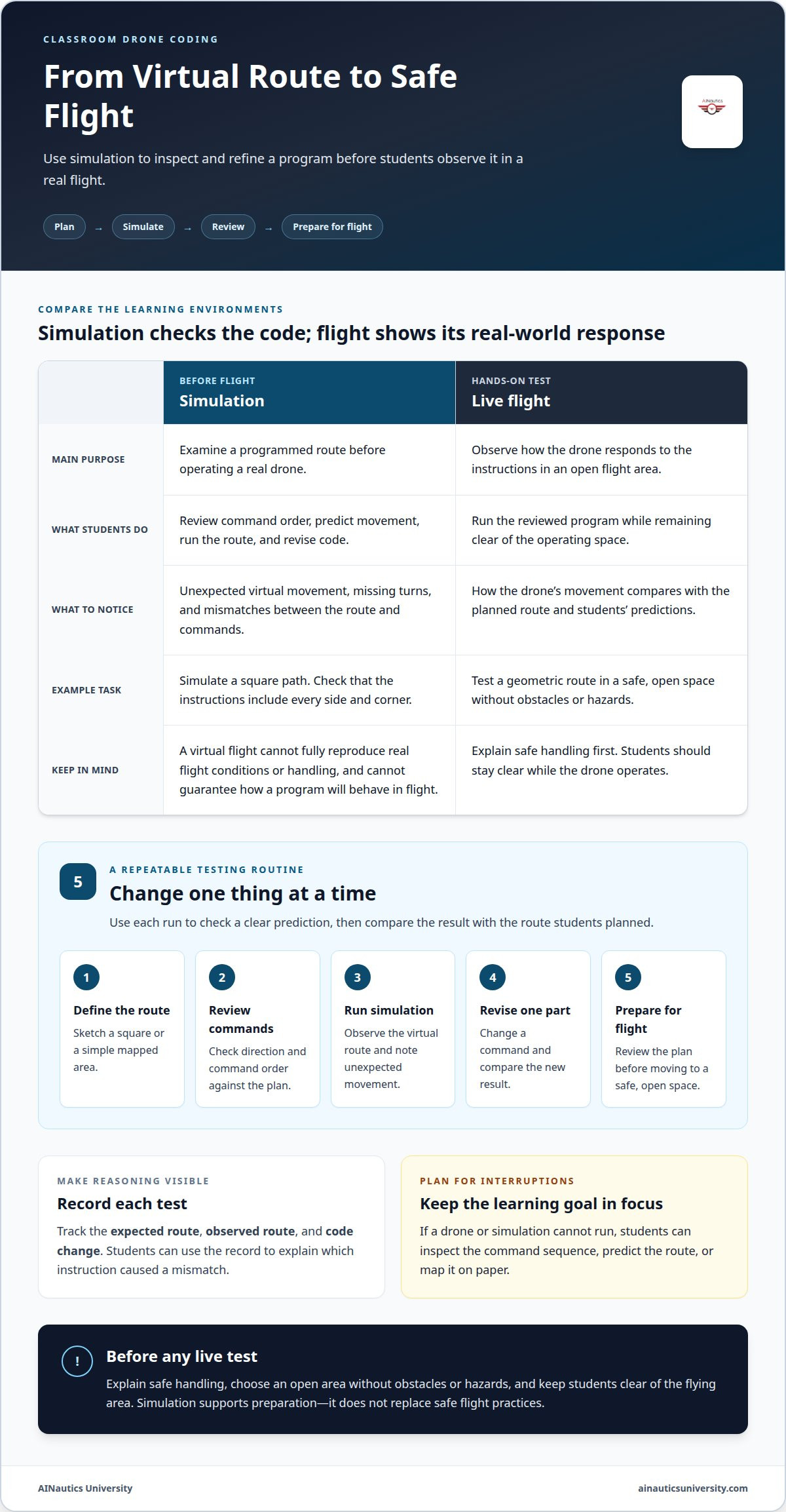
Simulation lets students examine a programmed route before flying a real drone. They can review how commands connect, predict movement, and spot gaps in a flight plan. Discussing the code in simulation helps students focus on the program before adding the demands of operating equipment.
For example, a class can program a square path using forward movements and turns. In simulation, students can check whether the sequence describes every side and corner. If the virtual route misses a turn, they can revise the instruction and run it again. The exercise links coding decisions to visible movement.
Simulation also supports integrated STEM learning. A planned route can combine coding, geometric patterns, and ideas about drone movement. Ask students to draw the path, mark each change in direction, and compare the drawing with the simulated flight. They can explain which instruction caused a mismatch.
Use a repeatable testing routine so each revision has a clear purpose:
- Define the route: Sketch the intended path, such as a square or a simple mapped area.
- Review the commands: Check that the instructions match the planned direction and order.
- Run the simulation: Observe where the virtual drone travels and note any unexpected movement.
- Revise one part: Change a command, then compare the new result with the earlier run.
- Prepare for flight: Review the final plan before moving to a safe, open space.
Record each test. A simple table with columns for the expected route, observed route, and code change helps students explain their reasoning. For instance, if a virtual drone turns too early, learners can identify the relevant instruction instead of changing several commands at once.
Simulation has limits. A virtual flight cannot fully reproduce the conditions or handling of a real drone, nor can it guarantee that a program will behave as expected in flight. Technical interruptions can also stop a simulation, so a paper route-planning task offers another way to test the logic.
Before a live test, review the route and operating area. Keep students clear of the flying area and use an open space without obstacles or hazards. The drone’s immediate response can show the effect of a coding choice, but students must observe from a safe position.
A drone simulation learning resource can support this practice as students move from virtual route testing toward classroom flight activities.
Professional development and educator support
Teacher preparation should connect drone operation, coding concepts, and classroom practice. Training on drone technology, coding, and classroom integration can help educators bring these areas together. Choose learning that includes an example lesson, such as programming a route, rather than focusing only on drone terminology.
Start by identifying what students should learn. A coding unit might focus on sequencing, while a broader STEM lesson could connect flight paths with geometry. This goal helps educators select suitable activities, anticipate questions, and decide what evidence will show understanding. For example, students can explain how a command changes a route, rather than simply demonstrate that the drone moved.
Professional learning can also help teachers adapt activities to different experience levels. A class new to coding may need guided practice interpreting instructions before creating a flight plan. More experienced students can revise a program and explain their decisions. The same route-planning task can support different learning goals without changing its central challenge.
Use educator training to rehearse the full lesson, including transitions between coding, discussion, and flight activities. Teachers can practice explaining a command, predicting its result, and guiding students through a revision. Rehearsal also helps identify directions that need simpler language and places where learners may need an example before working independently.
For classroom use, prepare a short lesson plan with these elements:
- Learning goal: Name the skill, such as sequencing commands or reasoning about a route.
- Student task: Describe a concrete challenge, such as planning a path through marked points.
- Teacher prompts: Prepare questions like, “Which instruction changes the direction?”
- Evidence of learning: Ask students to explain one code revision and its effect.
- Backup activity: Keep a paper-based route or code review ready if software fails.
Educators teaching learners in grades 4 through 8 can use these lesson elements to make drone coding interactive and purposeful. A teacher might invite students to predict a route first, then compare their reasoning with the programmed result. That structure gives students an active role while helping the educator focus discussion on coding logic.
Support should continue after the first lesson. Note which command students misunderstood, then adapt the next activity with a worked example. If learners confuse movement and direction, a follow-up session can separate those ideas before combining them. Recording observations makes curriculum changes more deliberate and gives teachers a clear basis for planning instruction.
Different training formats can meet different preparation needs. A workshop can help teachers rehearse a lesson, an online course can build knowledge at an individual pace, and a webinar can address classroom integration questions. Match the format to the task, then apply a new strategy in a specific lesson.
Choosing educational drones
Drone coding activities are presented as an interactive approach for students in grades 4 through 8. They can suit beginners and more experienced learners when programming tasks match students’ skills, from simple commands to text-based coding.
Begin with the curriculum goal, not a list of drone features. If students will learn sequencing, choose equipment with programming capabilities that support ordered commands. If the goal involves repeated movement patterns, make sure the programming activities can represent them. Matching capabilities to the lesson keeps hardware relevant to learning.
Durability and safety also matter in the classroom. Equipment should withstand regular educational use and support a safe learning environment. Consider how students will use and observe the drone during planned activities. For coding flights, choose a safe, open space without obstacles or hazards.
Programming access determines which skill levels a drone can support. Beginner curricula often use visual interfaces where students drag and drop command blocks. Some platforms also let learners progress to text-based languages such as Python. A class might begin by arranging movement commands, then advance to editing code as students build confidence.
Use these criteria to compare a drone’s classroom fit:
- Curriculum match: Connect programming capabilities to a learning goal, such as sequencing or repeated movement.
- Skill progression: Consider whether activities can support visual coding and, where available, a transition to Python.
- Durability: Choose equipment designed to handle repeated classroom use.
- Safe use: Plan for operation in a clear, open area, with students kept away from the flight space.
- Lesson continuity: Consider how coding activities can continue if the drone or software has a problem.
A suitable choice depends on how well the equipment supports the lesson. A drone with programming features may still be a poor curriculum match if its activities do not address the concepts students are learning. A route-planning unit, for example, needs a way to express movement commands, while an introductory activity may benefit from a visual coding interface.
Schools can explore district budgets, grants, or community partnerships to fund educational equipment. Priorities and eligibility depend on the funding source, so connect the request to a clear learning goal and explain how the drone supports classroom instruction.
Compare options against the same lesson plan before choosing. A written goal, such as teaching students to arrange commands into a route, makes it easier to assess whether durability, programming access, and safe classroom use suit the activity.
Teaching block coding and Python through programmable drones
Drone programs turn coding concepts into instructions students can observe in flight. Teaching coding with programmable drones can progress from visual blocks to Python, while testing and revision help students strengthen their programming logic.
Teaching Block Coding with Drones
Block coding lets students build a program by arranging visual command blocks instead of typing code. For learners in grades 4 through 8, those blocks make flight instructions easier to inspect and discuss. A teacher might introduce commands for takeoff, movement, turning, hovering, and landing. Students can arrange them into a sequence and predict the route the drone will follow.
Blocks also make core programming ideas visible. Students can set a variable for distance, speed, or height, then use a loop to repeat movements in a square pattern. If the drone follows an unexpected route, students can trace the sequence and revise a command. This makes a coding choice observable and gives the class a concrete starting point for discussion.
Teaching Python Through Drone Coding
Python-based drone coding asks students to write flight instructions as text rather than arrange visual blocks. Some platforms let learners progress from block programming to text-based languages such as Python. This shift connects familiar ideas, including sequencing and variables, with another way to express instructions.
Keep the first Python task focused. Students might translate a movement sequence they already understand, then compare the typed instructions with the blocks. More advanced lessons can introduce conditionals, which let a program respond to sensor data or environmental conditions. By changing an instruction and observing how the planned movement changes, students can test, debug, and improve their logic.
Steps in a Drone Coding Lesson Plan
A structured lesson moves from a clear goal to a tested program and reflection. For example, students can create and refine a geometric route. Teaching coding with programmable drones works best when learners can explain both the code and the reasoning behind their choices.
- Set the goal: Ask students to program a drone to follow a simple route.
- Plan the movement: Have students map the path and identify distance, direction, and positioning.
- Build the program: Arrange visual blocks in sequence, adding a variable or loop when appropriate.
- Test the logic: Run the program in simulation and compare the expected route with the result.
- Revise: Change a command, test again, and explain how the adjustment affected the program.
- Extend the task: Translate part of the sequence into Python when the platform supports it.
For a live flight, use a safe, open space without obstacles or hazards, and keep students clear of the flying area. Close by asking each learner to identify one coding decision and its effect. Their explanation shows whether they understand the program behind the drone’s movement.
AINautics University: Train-the-Teacher Program
AINautics University’s Train-the-Teacher Program helps educators integrate autonomous systems into their curriculum. It is a relevant next step when you are ready to move from lesson ideas to classroom planning for drone coding.
Use the Drone Simulator to support virtual practice, or explore the VR Trailer Mobile Lab as an educational resource. Educators preparing for FAA Part 107 certification can also consider Part 107 Training. Each option addresses a different learning need, from teacher preparation to simulation or certification training.
Consider which part of your program needs support first: educator preparation, coding practice, or broader UAS learning. That focus can help you choose a useful next step for your classroom. Contact AINautics University to discuss educational support.
Turn classroom coding into a lasting learning path
Use the next lesson to connect students’ coding practice with broader questions about autonomous systems. As students refine their programs, invite them to explain their decisions and consider where these skills could lead. Teaching coding with programmable drones can open the door to the wider UAS field, not just a single classroom activity.
Educators looking to develop that pathway can draw on AINautics University’s Train-the-Teacher Program, Part 107 Training, and VR Trailer Mobile Lab. These offerings support different needs, from preparing teachers to building knowledge of certification and bringing UAS learning into an educational setting.
Choose the next step that fits your learning goals, whether you are planning educator development or exploring certification. Contact AINautics University to get started and continue building a thoughtful, future-focused learning experience.
Frequently Asked Questions
Which coding concepts can students learn with programmable drones?
Students can explore algorithms by breaking a flight task into smaller instructions, then connect those instructions to drone hardware, mechanics, and electronics. For example, learners might discuss how software commands interact with the motors that move the aircraft. This systems perspective helps students see coding as part of a larger technology, not just text or blocks on a screen.
What are the best programmable drones for teaching coding in 2026?
The best fit depends on your teaching goals and learners’ experience, rather than a particular model name. Look for programming features that support the curriculum, with a path from introductory visual coding to text-based work if that progression matters. Before choosing equipment, map a sample lesson to the drone’s coding environment and make sure it supports the commands students need.
How do drone coding platforms compare: Scratch, Python, Blockly, and JavaScript?
Scratch and Blockly use visual blocks, while Python and JavaScript use typed text. Blocks let learners arrange commands visually; text-based languages require them to write instructions using programming syntax. A platform’s drone commands and features can vary, so the language name alone does not show what a drone can do. Compare platforms using a classroom task, such as planning a route.
How much do classroom-ready programmable drones cost?
There is no single cost for a classroom setup. The budget depends on the equipment, compatible software, accessories, replacement needs, and number of learners sharing the equipment. Define the intended lessons first, then separate essential items from optional additions. This helps schools plan around curriculum needs instead of paying for features they will not use.
What equipment and software are needed to teach coding with drones?
A basic lesson needs a programmable drone, a compatible coding platform, and a device that can run it. The software should support the commands students will use, and the classroom plan should provide a suitable space for flight activities. Teachers can also prepare a route sketch or command worksheet so students can plan and explain their code away from the controls.
What FAA rules apply to educational drone use in U.S. schools?
School use doesn’t automatically determine which FAA requirements apply; the planned drone operation matters. Before a flight, identify its purpose, location, operator, and how the aircraft will be controlled. These details help frame the compliance questions for the activity. Educators seeking certification knowledge can consider AINautics University’s Part 107 Training as part of their preparation for UAS learning and instruction.

Article by
AINautics University Team
The team behind AINautics University, dedicated to drone education and FAA Part 107 certification prep, VR flight simulation, and STEM training programs for students and educators.


