
A school drone lab can start with simulation rather than a full fleet of aircraft. Setting up a drone simulator lab in school gives students a way to practise controls and build foundational skills before moving on to hands-on activities.
Before proposing a lab, it helps to understand the main cost and space considerations. Your needs depend on the equipment, student activities, and whether the room will also support assembly or other practical work. Funding eligibility varies by program, so connect the lab’s purpose to the learning outcomes it will support.
This guide covers the main cost drivers, space planning, and factors to consider when exploring funding. It also explains how simulation-first lessons can support student training, from basic flight practice to structured UAS learning. Use these points to shape a lab that fits your school’s goals and resources.
Key Takeaways
- For eligible India-based institutions, explore whether AICTE IDEA Lab or PM-USHA could align with your school’s lab goals, and connect the proposal to student learning outcomes.
- Plan costs around the lab’s intended activities, from simulation and safety equipment to hands-on projects.
- Match the room layout to its uses, such as instruction, simulator practice, assembly, and controlled demonstrations.
- Build student learning progressively, pairing simulator practice with safety procedures and supervised practical activities.
- Consider how curriculum planning and faculty preparation can help turn lab equipment into sustained student projects.
Do you provide student training along with infrastructure?
A school lab works best when curriculum and equipment develop together. Track progress with simulator logs, task checklists, and student project reviews.
Curriculum and Faculty Training
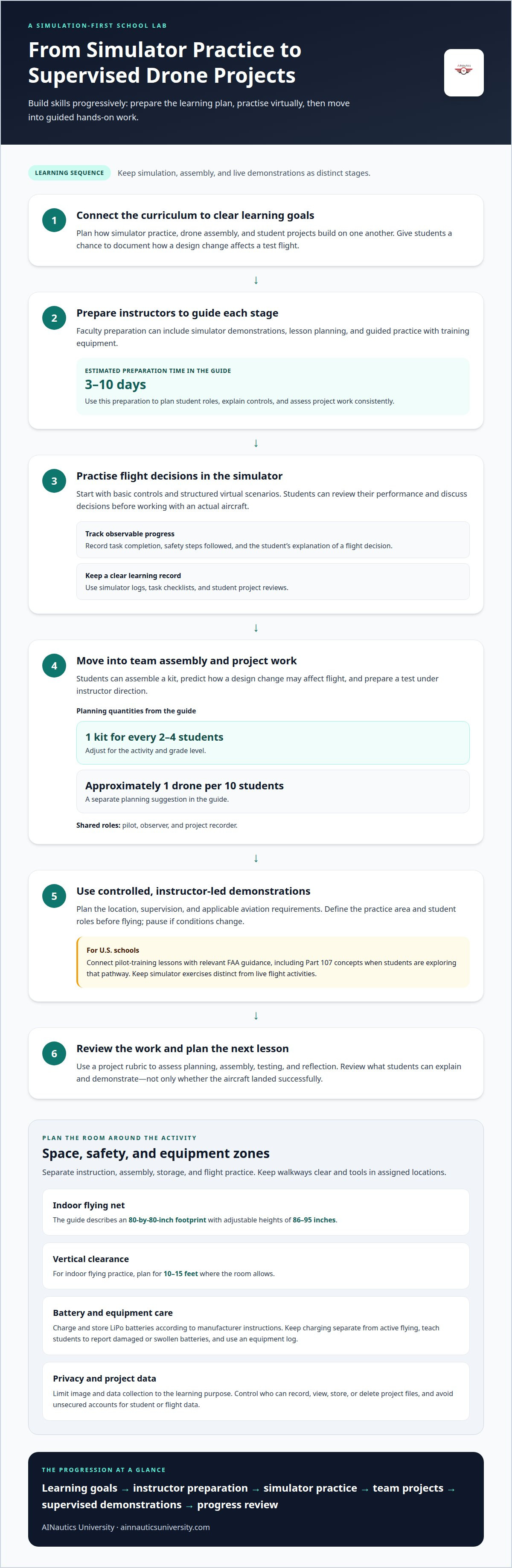
A curriculum links simulator practice, drone assembly, and student projects to clear learning goals. This alignment helps teachers build skills progressively. Students can begin with basic controls, then document how a design change affects a test flight.
Faculty preparation can include simulator demonstrations, lesson planning, and guided practice with training equipment. One guide estimates teacher training and demo classes take 3-10 days. Instructors can use that preparation to plan student roles, explain controls, and assess project work consistently across lessons.
Indoor Simulation and Outdoor Flight
Indoor simulation lets students practise flight scenarios virtually before supervised outdoor demonstrations. Learners can become familiar with the controls, review their performance, and then progress to another skill. Instructors can introduce tasks in a structured way and discuss flight decisions before students work with an actual aircraft.
Outdoor training adds practical experience and needs its own plan for location, supervision, and applicable aviation requirements. In U.S. schools, connect pilot-training lessons with relevant FAA guidance, including Part 107 concepts when students are exploring that pathway. Keep simulator exercises distinct from live flight activities, with an instructor directing each stage.
Progress checks can be simple and repeatable. Record whether each student completes a simulator task, follows the lesson’s safety steps, and explains a flight decision. A project rubric can also assess planning, assembly, testing, and reflection. These records help teachers track development beyond a successful landing.
Training can combine simulator sessions with assembly kits and training drones. A practical planning ratio is one kit for every 2-4 students, adjusted for the activity and grade level. Another guide suggests approximately one drone per 10 students. Shared roles, such as pilot, observer, and project recorder, give students defined responsibilities during group activities.
Projects help students connect practice with engineering. A team might assemble a kit, predict how a design change could affect flight, test it under instructor direction, and present its findings. Keep simulator practice, physical assembly, and outdoor demonstrations as distinct learning stages. Teachers can then monitor progress while students build confidence through specific, observable tasks.
What Problems Does a School Lab Setup Solve?
A well-planned drone lab separates simulation, assembly, and supervised demonstrations. This structure helps schools organize equipment, student movement, and classroom activities in one workspace.
Lab Space and Safety Infrastructure
Lab space and safety infrastructure assign clear areas for instruction, assembly, storage, and flight practice. These zones matter because soldering, battery handling, and flying involve different activities. An indoor flying net may have an 80-by-80-inch footprint and adjustable heights of 86-95 inches. Keep walkways clear, store tools in assigned locations, and make activity-specific safety equipment accessible.
For indoor flying practice, plan for 10-15 feet of vertical clearance where the room allows. Place mapping workstations away from active assembly areas. This layout helps instructors supervise lessons and limits unnecessary movement through the practice zone.
Controlled Demonstrations and Safety Procedures
A controlled demonstration uses a defined practice area, a prepared aircraft, and clear student roles. Before flying, the instructor can explain the task, identify who observes, and pause the activity if conditions change. Students see flight planning in practice, rather than treating a successful flight as the only sign of safe work.
Use simulation before live demonstrations, then keep each activity within its planned boundaries. In U.S. schools, connect pilot-training lessons with applicable FAA guidance and Part 107 concepts. Keep classroom simulation distinct from actual flight instruction, and have an instructor lead demonstrations and explain the decisions behind each activity.
Battery handling also needs a clear procedure. Charge and store LiPo batteries according to the manufacturer’s instructions. Designate a storage area, keep charging separate from active flying, and teach students to report damaged or swollen batteries. Staff supervision and a simple equipment log help educators track which batteries and aircraft are in use.
Match personal protective equipment to the activity, and give students clear instructions for when to use it. Soldering, for example, requires a different setup from simulator practice. Store tools, batteries, and training aircraft in assigned places, and include equipment checks in lesson plans.
Include privacy and cybersecurity in the lab plan. Mapping exercises or camera-equipped aircraft may capture images of people, property, or school spaces. Limit data collection to the learning purpose, control access to recordings, and avoid sharing student or flight data through unsecured accounts. Set expectations for who may record, view, store, or delete project files.
These procedures help schools manage more advanced activities as students progress. A drone simulator can support simulation-first practice before controlled demonstrations, giving instructors a way to teach planning and decision-making before live flight.
Drone Lab Setup Cost What Should You Actually Budget?
Start with the learning activities, then group equipment into clear budget categories. Simulator computers, training drones, safety gear, and testing tools serve different purposes.
Computer and internet needs depend on the simulator software and planned tasks. For drone imagery and mapping data processing, plan for computers with at least 16 GB of RAM. Confirm whether the chosen simulator needs online access for lessons or account features, and include reliable connectivity in the technology plan where required.
Lab Equipment and Drone Modules
A school lab can combine simulator stations, training drones, assembly components, and safety equipment. Students need tools for both virtual practice and physical projects.
Budget categories may include beginner training drones, DIY assembly kits, spare components, batteries, and dedicated storage. The kit-to-student ratio affects how many teams can build or test at once. Match equipment to the academic goal: basic flight training has different needs from a project focused on assembly or mapping.
Simulator Hardware and Internet Requirements
Simulator hardware includes the computer, display, and compatible controls needed for the selected software. Separate these requirements from computers used for processing imagery, where 16 GB of RAM is recommended.
Plan internet access around whether lessons, accounts, or simulator functions require a connection. Identify which activities run on local computers and which need online access. This helps schools budget for classroom connectivity without assuming every simulator requires the same setup.
For cost planning, divide the proposal into equipment groups instead of treating the lab as a single purchase. A starter setup might prioritize simulator workstations and a small number of training drones. A more advanced academic program may add assembly kits, testing equipment, and project-development tools. The number of students sharing each station also affects equipment needs.
Indoor flight nets and personal protective equipment are separate budget lines. The research describes an indoor net with a minimum footprint of 80 by 80 inches and adjustable heights of 86-95 inches. Match the enclosure to the aircraft and activity, then include suitable PPE for practical tasks. Avoid counting a net as a replacement for instructor supervision or safe operating procedures.
Choose testing equipment to support the learning objectives. In a beginner assembly module, students may need components that show how parts fit together. A more advanced validation activity may require equipment to check a build or document results. List each tool beside the lesson that uses it, so purchases support a defined student task.
Include recurring needs in the budget. Training drones may need replacement components, while batteries and simulator computers require organized storage and maintenance planning. A clear inventory connects each item to a class, mission, or project, helping schools prioritize essential technology before adding optional equipment.
Drone lab space and setup timelines
A starter school lab can use 300-500 square feet; a standard lab may need 500-800. Arrange classroom instruction, simulation, and hardware work in separate zones.
Teachers can manage setup in stages: assess the room, plan zones and curriculum, procure equipment, then install and test it. A full setup from site visit to operational status typically takes 4 to 8 weeks, depending on procurement timelines and infrastructure readiness.
Classroom Space and Lab Zones
Create distinct zones for instruction, simulator practice, assembly, and storage. This separation helps students move between activities without crowding active work areas.
A starter layout may fit 300-500 square feet, while a standard school lab may use 500-800. A theory, assembly, and simulation configuration can fit approximately 600-800 square feet. Advanced labs with dedicated zones may need 800-1,200 or more. Colleges planning larger projects can adapt these zones to their equipment and class activities.
Step-by-Step Lab Management
Step-by-step lab management connects room planning, equipment installation, and teaching readiness. A clear sequence helps faculty track dependencies and prepare the classroom for students.
Begin with a needs assessment, then develop the room plan, equipment list, and curriculum. The guide estimates 1-3 days for needs assessment and 3-7 days for design, bill of quantities, and curriculum planning. Procurement and installation may take 7-21 days, while the full setup may span 4 to 8 weeks.
During assessment, map each activity to a specific zone. Place simulator controllers at classroom workstations, assembly hardware on dedicated benches, and storage away from student walkways. Allow enough room for the planned class size and the movement each lesson requires. A sensor or mapping exercise may also need a workstation for reviewing data.
After designing the lab, schedule procurement and installation around school access and equipment readiness. Set up computers, controllers, and other hardware, then test each station before instruction begins. Run a sample lesson to check that students can move between simulation and assembly zones without disrupting other activities.
Management continues after installation. Assign storage locations, use a sign-out process, and return controllers and hardware after each class. Review the layout as the curriculum changes. A course with more assembly work may need additional bench space, while a simulator-focused unit may benefit from accessible computer stations.
Use the timeline as a planning framework, not a substitute for the school’s procurement schedule. Key dependencies include room readiness, equipment delivery, installation, and curriculum preparation. Coordinating these steps gives faculty a clear path from an empty classroom to a functioning drone lab.
Simulation-first drone learning
Simulation-first learning puts virtual flight practice before aircraft operation. For educators setting up a drone simulator lab in school, this means making the simulator part of the lesson plan, not just another piece of equipment. Students can complete a task, review what happened, and apply what they learned in later activities. For example, a class can practise a planned route virtually before discussing how real-world conditions might affect the mission.
A software-in-the-loop simulation runs flight software in a virtual environment. Students can connect lessons about controls and navigation with simulated aircraft behavior. Instructors can present a consistent scenario and guide students as they interpret the results. This makes it easier to focus a lesson on one objective, such as understanding a route or responding to a control input.
Named tools can support more advanced lab learning. PX4, Gazebo, ROS, and QGroundControl are associated with a Drone Lab platform for simulation and UAV development. Students can encounter flight software, a virtual environment, robotics tools, and ground-control software within one learning workflow. The key is to connect each tool to a clear classroom task, rather than introducing technology without a project goal.
Begin each activity by stating the mission and the evidence students should produce. Ask students to plan a virtual route, run the simulation, and explain how their choices shaped the result. Then have groups compare their approaches. This makes a flight exercise an opportunity to develop analysis and communication alongside technical skills.
Build skills in stages. Students can first identify simulator controls and complete a guided task. Next, they can adjust a plan, observe the simulated response, and describe what changed. Later lessons can connect virtual practice with electronics, assembly, or supervised aircraft demonstrations. Treat actual flight as a separate stage, supported by concepts students have already practised.
Simulation also makes repeatable experiments possible. A student team can change one planned input, rerun the same virtual scenario, and compare outcomes. Instructors can assess whether students followed the task, interpreted results, and explained their conclusions. This shows learning beyond whether a simulated flight reached its destination.
For schools setting up a drone simulator lab in school, connect platform choices to curriculum outcomes. A programming exercise might explore how software influences a simulated mission, while a robotics lesson could examine how sensors inform decisions. These examples give drone labs an academic purpose and connect technical concepts with UAS applications.
To shape simulation activities around your school’s learning goals, explore drone simulator learning as a starting point for building a focused program.
AINautics University: Drone Simulator
AINautics University helps schools connect drone simulation with student learning and educator preparation. Its Drone Simulator supports virtual flight practice, and its Train-the-Teacher Program helps educators bring autonomous systems into their curriculum.
Schools can also connect simulator-based learning with Part 107 Training when students are exploring a professional certification pathway. For programs that benefit from a mobile learning environment, the VR Trailer Mobile Lab offers another way to introduce UAS education. Self-Paced Certification and the UAS Student Scholars program can support students’ next steps.
Explore AINautics University’s drone education programs when shaping a curriculum, preparing teachers, or introducing students to drone skills. Contact AINautics University to discuss which offerings fit your school’s learning goals.
Turn Your Lab Plan Into a Learning Pathway
A school lab can be more than a room with technology. Treat it as the start of a learning pathway where students build confidence through practice, reflection, and increasingly applied projects. Connect each activity to the skills students should carry into future UAS study or careers.
For schools shaping that pathway, AINautics University offers Part 107 Training, a Train-the-Teacher Program, and a VR Trailer Mobile Lab. Students can also explore Self-Paced Certification options and the UAS Student Scholars program as they progress toward certification and future UAS opportunities. These resources can support different needs, from educator preparation to career-focused learning. They can also help schools consider how simulation fits alongside broader drone education.
Setting up a drone simulator lab in school gives students a structured entry into aviation technology. Start with learning goals, then build a program that can grow with your students and educators.
Contact AINautics University for lab advice and take the next step toward a purposeful drone learning experience.
Frequently Asked Questions
Can this lab be funded under AICTE IDEA Lab or PM-USHA?
No. AICTE IDEA Lab and PM-USHA are India-focused programs, not U.S. school funding pathways. In the United States, schools can explore district STEM or career and technical education budgets, as well as state or federal education grants when eligible. Build a proposal around student outcomes, curriculum fit, and the costs the funding program permits. Eligibility and allowable expenses depend on each program’s requirements.
How much space does a Drone Technology Lab require?
The space you need depends on how many students use the lab at once and which activities happen concurrently. A simulator-only class needs workstation access, while assembly or demonstrations also require room for those activities. Before choosing a room, sketch the intended class flow and equipment placement. This helps determine whether one shared room can serve the planned program.
Need a Practical School Lab Plan?
Start with the school’s learning goals, not a shopping list. Identify the courses and student projects the lab should support, then decide what teachers need to deliver them. Plan how to organize shared equipment and schedule access across classes. This makes the proposal easier to explain to school leaders and links each resource to a clear educational purpose.
Space Requirement: How Much Area Is Needed?
There is no single area requirement that suits every school. Decide whether students will use the room only for simulator lessons or share it with other activities. Consider how many workstations are needed during a class and whether equipment can be stored elsewhere. If space is limited, schedule activities at different times rather than fitting every function into one room.
What Exactly Is a Drone Lab, and Who Actually Needs One?
A drone lab is a learning setting where students explore unmanned aircraft systems through structured instruction and related activities. It can suit K-12 schools building STEM or career and technical education pathways, as well as colleges developing more advanced coursework. A school can decide whether a lab fits by identifying curriculum goals, teacher readiness, and student interest in aviation, robotics, or autonomous systems.
What equipment and software are needed for a school drone simulator lab?
At minimum, plan around the selected simulator’s computer and control needs, along with any software access required for lessons. Additional equipment depends on whether the curriculum includes assembly or other practical projects. Before choosing a platform, match its intended use to students’ learning level and the instructor’s lesson plan. This keeps technology choices tied to classroom outcomes rather than features alone.
How much does it cost to set up a drone simulator lab for a school?
The budget depends on the program’s scale and purpose. A simulator-focused classroom has different purchasing needs from a lab that also supports hands-on projects. Estimate costs based on equipment, software, and classroom resources tied to planned lessons. A phased proposal can separate what is needed to begin instruction from additions that support future curriculum development.
Which drone simulators are best for K-12 schools and how do they compare?
The right choice depends on students’ age, course goals, and how the teacher plans to use simulation. Compare options by how well they support the intended lessons and connect practice to broader UAS learning. A beginner class may prioritize accessible flight exercises, while an advanced course may need simulation that supports more technical concepts. Choose for curriculum fit, not complexity alone.

Article by
AINautics University Team
The team behind AINautics University, dedicated to drone education and FAA Part 107 certification prep, VR flight simulation, and STEM training programs for students and educators.


