
What if students could practise the decisions behind safe drone flight before a physical aircraft ever leaves the ground? A drone simulator classroom gives students a structured way to explore UAS concepts, plan a route, and explain their choices before moving on to physical equipment. Simulation isn’t a substitute for real-world practice, but it can help make that next step more purposeful.
To get useful learning from a simulator, start with a clear objective rather than simply giving students time to explore. Ask them to plan a route, explain the information they used, or review how they would change their approach. This makes the activity easier to connect to classroom goals and gives students something specific to discuss or document.
This guide explains what classroom simulation can teach, how to connect practice with curriculum goals, and how to plan a supported route toward hands-on flight. AINautics University’s Drone Simulator, Train-the-Teacher Program, and VR Trailer Mobile Lab can support classroom learning. Part 107 Training and Self-Paced Certification offer further learning options for students interested in certification.
Key Takeaways
- Use a drone simulator classroom to introduce UAS concepts and explore flight paths before students move to physical equipment.
- Build lessons around a clear objective, a scenario, guided practice, and a review that helps students reflect and revise.
- Choose simulation or physical drones based on the learning focus, classroom setup, and type of practice students need.
- Connect simulator activities to relevant state or district standards to give technology practice a clear place in the curriculum.
- Use AINautics University’s educator and student programs to support continued learning beyond classroom simulation.
What a drone simulator classroom can teach students
A classroom drone simulator gives students a virtual setting to explore unmanned aircraft system (UAS) concepts before starting with physical flight. Students can consider how to plan a route, what information a task requires, and how changing an approach affects their plan. For a broader overview of the field, see Unmanned aircraft system simulation.
A definition educators can share: “A drone simulator classroom is a learning environment where students explore UAS concepts and practise decisions through simulated flight scenarios before working with physical aircraft.” This frames simulation as a teaching approach, not a replacement for every part of drone education.
Simulation has clear boundaries. Virtual practice isn’t real-world flight experience, and completing an activity doesn’t itself provide certification or regulatory authorization to fly. Instead, it gives students a structured opportunity to explore concepts and think through a task. Educators can connect that learning to later instruction and appropriate real-world practice.
Which classroom skills can simulation help develop?
Use the activity to prompt planning, problem-solving, and reflection rather than assuming a simulator will develop these skills on its own. For example, give students a scenario with a starting point and destination. Ask them to plan a route, explain why they chose it, and identify what might lead them to revise the plan. After the simulation, have them compare their initial reasoning with what they noticed during the activity.
This approach makes the learning visible. Students might sketch a route, annotate a scenario, or write a short explanation of a decision. These tasks can connect with STEM learning by asking students to represent information, describe patterns, or explain how changing one part of a plan affects another. The teacher sets the objective and guides the discussion, so the simulator supports the lesson rather than becoming the lesson by itself.
Who can benefit from a classroom simulator?
Teachers can use simulation to introduce UAS concepts without making physical flight the starting point. Students exploring technical subjects can work through scenarios, test an approach, and explain their reasoning. School leaders can consider how simulator activities complement existing STEM instruction and support curriculum goals already being taught.
Adapt the activity to students’ needs and the lesson objective. One class might focus on describing a route; another might compare two plans and justify a revision. A clear prompt, suitable scenario, and brief reflection help students understand what they are learning and give educators a way to review their progress.
For schools building a broader pathway, AINautics University’s Drone Simulator offers a classroom resource within its UAS education programs. Its Train-the-Teacher Program supports educators integrating UAS into their curriculum, and curriculum alignment with state and district standards can connect activities to existing learning goals. Simulation is a starting point for exploration, with further instruction and practical experience forming distinct steps in a student’s UAS education.
How classroom drone simulation supports learning before flight
Simulation can make practice more deliberate when each activity has a clear purpose. Use it as one stage in a learning process: students understand a task, plan an approach, practise, review what happened, and revise their thinking. This cycle gives learners a chance to explain their decisions, not just complete an activity.
Simulation practice develops decision-making in a virtual setting; operating an aircraft requires separate, real-world instruction and experience. Keep that distinction visible to students. Ideas explored in simulation can inform later learning, but the experience doesn’t guarantee readiness to control a physical aircraft. Simulator activity by itself also doesn’t confer certification or authorization to fly.
From a virtual scenario to a learning objective
Begin with a specific objective, such as planning a route or interpreting the requirements of a scenario. Tell students what they should be able to describe or demonstrate by the end. Before they practise, ask them to state their approach and explain what information they will use. This makes the reasoning behind their choices part of the lesson, rather than focusing only on whether they complete the task.
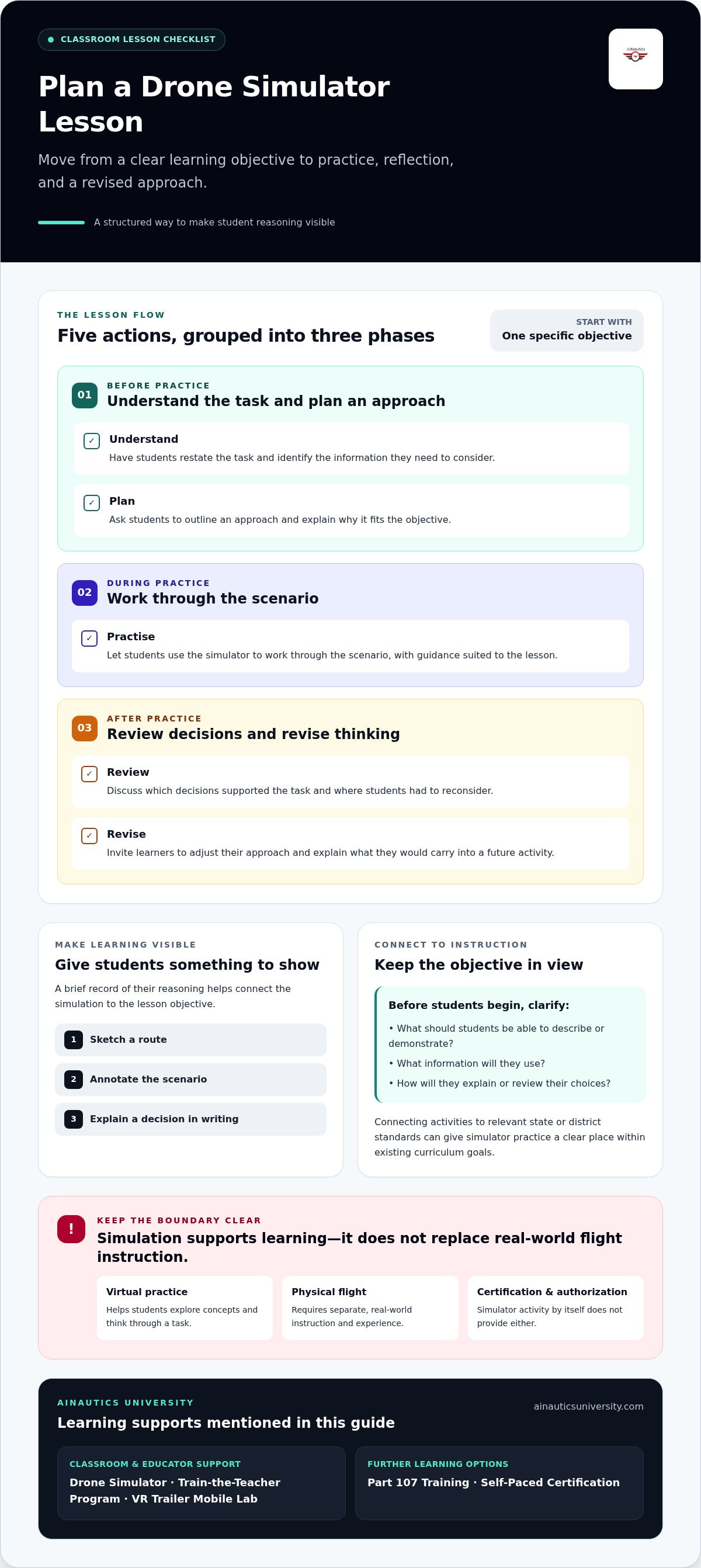
- Understand: Have students restate the task and identify what information they need to consider.
- Plan: Ask them to outline an approach and explain why it fits the stated objective.
- Practise: Let students work through the scenario in the simulator, with guidance appropriate to the lesson.
- Review: Discuss which decisions supported the task and where students had to reconsider.
- Revise: Invite learners to adjust their approach and explain what they would carry into a future activity.
For instance, introduce a scenario with a defined destination and ask students to describe the information they would use to plan a route. After practice, have them compare their original reasoning with what they noticed during the activity. The goal isn’t to assume that a simulator models every real flight condition. It’s to give students a structured prompt for planning, discussion, and reflection.
What simulation cannot replace
A simulator isn’t the same as operating a physical aircraft. Virtual practice does not recreate every aspect of real-world conditions, equipment, or flight responsibilities. Keep learning outcomes specific: use simulation to explore concepts and decision-making, then use separate instruction and supervised practical experience to address physical flight skills. Certification preparation is also a distinct learning goal, not an automatic result of simulator use.
Help students understand the difference by naming the objective before each activity and closing with a reflection: What did the scenario let us practise? What would require a different kind of instruction or experience? This keeps simulation in its proper role and shows how one learning stage can prepare students to engage thoughtfully with the next.
AINautics University’s simulation and scenario-based training can support educators planning purposeful virtual practice as part of broader UAS learning. Explore the AINautics Drone Simulator as a resource for connecting classroom scenarios with future learning goals.
Drone simulator vs. physical drones: choosing a classroom starting point
Choose the learning method that matches the lesson, not the assumption that one approach is always better. A drone simulator classroom can offer structured virtual practice, while a physical drone gives students an opportunity to learn with real equipment. Each serves a different purpose, and a broader UAS program can use both at appropriate stages.
| Learning focus | Classroom setup | Kind of practice |
|---|---|---|
| Simulation: Explore UAS concepts, scenarios, and planning decisions. | Set up a virtual learning activity around a defined lesson objective. | Practise in a simulated scenario, then discuss choices and reasoning. |
| Physical drone: Learn through interaction with real aircraft and flight activity. | Plan an appropriate physical activity, including the arrangements and applicable requirements for that setting. | Gain practical experience with real equipment under suitable instruction and oversight. |
Use the comparison to ask a practical question: what should students learn or demonstrate by the end of the lesson? If the goal is to discuss a plan or interpret a scenario, simulation may be a useful starting point. If the objective involves operating physical aircraft, students need an activity designed around real-world practice. One format doesn’t automatically replace the other.
When is a simulator a practical first step?
Simulation can be a helpful entry point when educators want students to explore UAS ideas before planning physical flight activities. A shared scenario gives the class a common basis for discussion: students can describe their approaches, compare reasoning, and identify questions for further learning. As one part of a wider STEM or UAS program, simulation can introduce concepts without becoming the program’s only experience.
When should learning include physical flight activities?
Include physical flight when the learning objective requires students to engage with real aircraft. Plan it as its own instructional activity, with the learning goals, educator guidance, and applicable requirements for the setting in view. A simulator may inform classroom discussion, but it doesn’t establish readiness or authorization for real-world flight.
Schools can sequence these approaches around curriculum goals: introduce an idea, use a scenario to prompt discussion, then plan practical experience when it fits the instructional purpose. AINautics University’s educational resources include simulation and scenario-based training, alongside options such as its VR Trailer Mobile Lab for immersive learning. For a wider look at immersive approaches, see “Immersive Drone Training Technology: Shaping the Future of UAS Education in 2026.” This perspective can help educators consider how virtual and physical activities may complement one another without treating them as interchangeable.
How to plan a drone simulator lesson for your classroom
A purposeful lesson starts with what students should learn, not with which simulator activity looks most engaging. In a drone simulator classroom, a clear objective helps you choose a scenario, guide student thinking, and connect the activity to curriculum goals. Keep the task focused, then use discussion or reflection to see what students understood.
Set up the lesson around a clear objective
Choose one objective before selecting an activity. For example, students might practise interpreting a UAS scenario or explaining the reasoning behind a flight plan. Before starting, introduce unfamiliar terms in plain language. A short explanation of “flight path,” for instance, gives students a shared vocabulary for discussing a route.
Choose a scenario that lets students show their thinking, not just complete a task. A simple lesson sequence can help:
- Set the objective: State what students should explain, identify, or compare by the end.
- Introduce the scenario: Share the task and define any terms students need to understand it.
- Guide practice: Invite students to work through the activity, prompting them to describe their decisions.
- Review learning: Lead a discussion or written reflection tied directly to the objective.
Connect the objective to relevant state or district curriculum standards. Identify the subject-area concept the activity supports, such as interpreting information, explaining a process, or reasoning through a problem. Make that connection explicit in your lesson plan. This gives the simulator a defined role in instruction and helps school leaders see how UAS learning can fit within an existing STEM program.
Use reflection questions to assess reasoning rather than assume what students learned from an activity:
- What information shaped your decisions?
- Which part of the task made you reconsider your approach?
- What would you change if you tried the scenario again?
Prepare educators to lead UAS learning
Educator preparation can help teachers frame scenarios, explain concepts, and guide discussion in line with students’ needs and curriculum goals. AINautics University’s Train-the-Teacher Program supports educators integrating UAS into learning. For additional ideas on classroom integration, consider the article “Drone Curriculum for Educators: A Comprehensive Guide to Classroom Integration.”
Adapt the activity to your class by adjusting terminology, prompts, and reflection questions to fit the objective. AINautics University connects simulation with broader UAS education, including curriculum alignment with state and district standards. Explore AINautics University’s educator training pathway as you plan how simulation can support your classroom goals.
How AINautics University connects classroom simulation to UAS education
A classroom simulator can be a starting point, not a standalone program. AINautics University’s Drone Simulator is part of a wider set of educational resources connecting simulation and scenario-based learning with educator preparation, immersive experiences, and further study. Schools can use that range of options to consider what students might learn next while keeping each activity tied to its own purpose.
For students, a learning pathway can move from exploring UAS concepts to developing more specialized knowledge. Simulation supports scenario-based learning; it doesn’t replace physical flight experience or automatically confer certification. Educators can build a sequence that fits their curriculum and students’ interests, then introduce other learning options as appropriate.
Build educator capacity with training and curriculum support
Teachers shape how UAS topics enter the classroom. AINautics University’s Train-the-Teacher Program supports educators integrating UAS into learning, while curriculum alignment with state and district standards helps schools connect activities to established goals. Educators planning a broader initiative can also draw on ideas in “How to Start a Drone Program in Your School,” especially when considering how a classroom activity fits into a sustained program.
Preparation helps teachers plan with intention: identify the learning objective, choose an activity that supports it, and guide students through discussion or reflection. The aim isn’t to turn every lesson into flight training. It’s to give UAS learning a clear educational role and help educators make informed decisions about how it can develop over time.
Extend learning through the wider UAS pathway
AINautics University’s VR Trailer Mobile Lab supports immersive educational experiences, offering another way to extend learning beyond a simulator activity. For students exploring future opportunities, the UAS Student Scholars program is a further education resource. These options can contribute to a broader pathway without suggesting that every student or school needs to follow the same sequence.
Certification preparation is a distinct step. AINautics University offers Part 107 Training and Self-Paced Certification options for learners pursuing that goal. These are separate from classroom simulation, and educators can introduce them when they align with a student’s learning plans. The article “Professional FAA Part 107 Drone Training: The Ultimate 2026 Certification Guide” provides another point of reference for understanding certification preparation.
For schools, the central planning question is how each resource supports a defined learning goal. AINautics University’s education offerings connect simulator-based activities with educator support and future UAS learning. Explore AINautics University’s drone education programs to consider how these options fit your classroom or school pathway.
Turn classroom interest into a purposeful UAS pathway
Choose one learning goal, then decide how it could grow into a broader UAS opportunity for students. A well-planned drone simulator classroom experience can spark questions about technology, problem-solving, and future study. Use those questions to shape what comes next, whether that means extending classroom learning or planning a school-wide program.
AINautics University’s program implementation includes a structured 90-day school rollout, offering educators a framework for moving from initial planning toward a more established drone program. Consider how a supported launch could fit your school’s priorities, curriculum, and students’ interests.
Explore AINautics University’s drone education programs to plan a purposeful next step for your classroom or school.
Frequently Asked Questions
What is a drone simulator classroom?
A drone simulator classroom is a teaching setup where simulated drone activities support a lesson. The activity might be one part of a larger unit alongside a vocabulary sheet, a planning task, or a class discussion. For example, students could keep a brief learning log with terms they encountered, decisions they made, and questions they want to investigate. This makes the simulator part of a planned course rather than an isolated screen-based activity.
Can students learn drone skills without flying a real drone?
Students can develop knowledge about UAS topics without operating a physical aircraft. They might practise interpreting a mission brief, organize information provided by the teacher, or explain how they would prepare for a task. Document these outcomes in a worksheet or short presentation. Describe them as knowledge and planning activities, not hands-on aircraft operation.
Is a drone simulator a replacement for real-world flight practice?
No. If a course goal involves students handling and operating physical equipment, include an appropriate practical component in the program design. Before planning it, identify what students should learn, what instruction and supervision the activity requires, and how learning will be evaluated. Keep separate records for virtual activities and physical practice so families and school staff can understand what experience students have completed.
How can teachers assess learning during a drone simulator lesson?
Look for evidence that students can explain and review their decisions. Collect a written route rationale, ask students to annotate a scenario, or use a short rubric to assess how clearly they support a decision with information from the task. Compare their explanations with the lesson’s stated criteria, then use any gaps to plan a follow-up discussion. Activity completion alone doesn’t show that every learner understood the material.
Do teachers need drone experience to introduce a simulator lesson?
Not necessarily for a lesson focused on a well-defined classroom concept. Prepare by reviewing the activity, listing unfamiliar vocabulary, and choosing questions that will help students explain their thinking. If learners ask questions outside the lesson’s scope, record them for follow-up rather than guessing. For activities involving actual aircraft, plan suitable instruction and oversight as a separate part of the program.
Can a drone simulator support STEM learning in schools?
Yes. Build the lesson around a subject connection instead of treating the simulator as the learning objective. For example, students could represent a planned route on a paper grid, describe its sequence, and compare how different route choices affect their explanation. A short written justification can bring communication and reasoning into the activity. Choose a subject connection that aligns with the class’s current curriculum goals.
Does simulator practice qualify students for FAA Part 107 certification?
No. Simulator participation does not itself award FAA Part 107 certification. Help students distinguish classroom activity records from their separate certification study and testing process. They can use current FAA guidance to understand applicable requirements and identify the preparation they need. Don’t describe simulator completion as a credential, test result, or authorization to conduct drone operations.

Article by
AINautics University Team
The team behind AINautics University, dedicated to drone education and FAA Part 107 certification prep, VR flight simulation, and STEM training programs for students and educators.


