
What if a drone flight were the start of an investigation, not the whole lesson? Project-based learning with drones gives students a reason to plan a flight, collect evidence, and use what they find to answer a meaningful question. The challenge is making that work connect to curriculum goals without requiring every educator to be a drone specialist or letting the excitement of flying overshadow assessment.
This guide offers a practical framework for designing purposeful projects, from choosing a clear learning question to guiding student teams and evaluating their work. You’ll see how drone activities can connect subjects such as science, math, geography, and technology, while building technical, analytical, and collaborative skills. You’ll also find ways to adapt projects to available resources: AINautics University’s Train-the-Teacher Program can support educator readiness, while its Drone Simulator and VR Trailer Mobile Lab offer optional immersive learning experiences. The goal is simple: help students move from hands-on activity to evidence-based learning they can explain and extend.
Key Takeaways
- Make each drone project answer a meaningful learning question, rather than treating flight as the finished activity.
- Use a clear design sequence to connect project goals, student evidence, learning activities, and assessment.
- Adapt project-based learning with drones across subjects and to the time, tools, and experience available.
- Assess the process as well as the final product, including how students use evidence, collaborate, and communicate their findings.
- Build educator confidence with appropriate preparation, while treating simulation and mobile lab experiences as optional supports.
Why project-based learning with drones should start with a learning goal
A drone flight can capture attention, but attention alone doesn’t define a learning project. Start with what students should investigate, understand, or explain. Then decide whether drone-related work can help them gather or interpret useful evidence. This keeps the technology in a supporting role and gives each activity a clear purpose.
Project-based learning with drones is sustained inquiry in which students use drone-related work to investigate a meaningful question and communicate what their evidence reveals. The project may involve planning a flight, analyzing imagery, comparing observations, or exploring how the technology works. Flight is one option, not a requirement for every learning goal.
This approach aligns with the broader idea of project-based learning: students work through an inquiry connected to a question or challenge, rather than completing an isolated activity. For an overview of the model’s characteristics, see What is Project-Based Learning?
What makes a drone activity a learning project?
Give students a question they can investigate, such as, “Which areas of our schoolyard provide the most shade?” Teams might research how to gather relevant observations, plan a suitable method, and decide what evidence would help answer the question. If a flight is appropriate, it becomes one stage in that process, not the whole lesson.
Students then interpret what they collected and share a product that makes their reasoning visible, such as an annotated map, presentation, or written recommendation. A demonstration focused only on how to operate equipment can introduce a tool, but a project asks students to make decisions, support conclusions with evidence, and explain their findings.
Which learning goals can drone projects support?
Connect the project to the learning goals you already teach. A question about measuring a site can prompt mathematical thinking; examining changes in a landscape can connect to science or geography; designing a visual explanation can bring in art and communication. These are possible connections, not automatic outcomes. Define the intended learning first, then select activities and evidence that let students demonstrate it.
Drone projects can also open a path into computing and digital systems. A study described in the National Library of Medicine’s PMC collection presented aerial drones as tools for project-based IT and cybersecurity education. Its Summer Academy involved rising 10th- and 11th-grade students from 2016 to 2018. The example shows how an educator can frame drones around concepts beyond flight, while its specific program context should not be treated as a guarantee of results in other classrooms.
Keep the learning goal visible throughout. Ask students to explain why they chose a method, what their observations do and don’t show, and how their final product answers the original question. That makes the project’s value easier to recognize, assess, and build on.
How to design a project-based learning experience with drones
Turn a learning goal into a sequence students can follow and explain. Before choosing equipment or planning a flight, decide what question students will investigate, what evidence can help them answer it, and how they’ll share their conclusions. This keeps the project focused, even when class time, student experience, or access to drone activities varies.
For a broader classroom integration perspective, explore this drone curriculum for educators guide. PBLWorks also outlines core project-based learning components in its PBLWorks: Defining Project-Based Learning resource. Use these frameworks to shape the inquiry, then tailor its scope to your students and instructional goals.
Begin with a question and a visible outcome
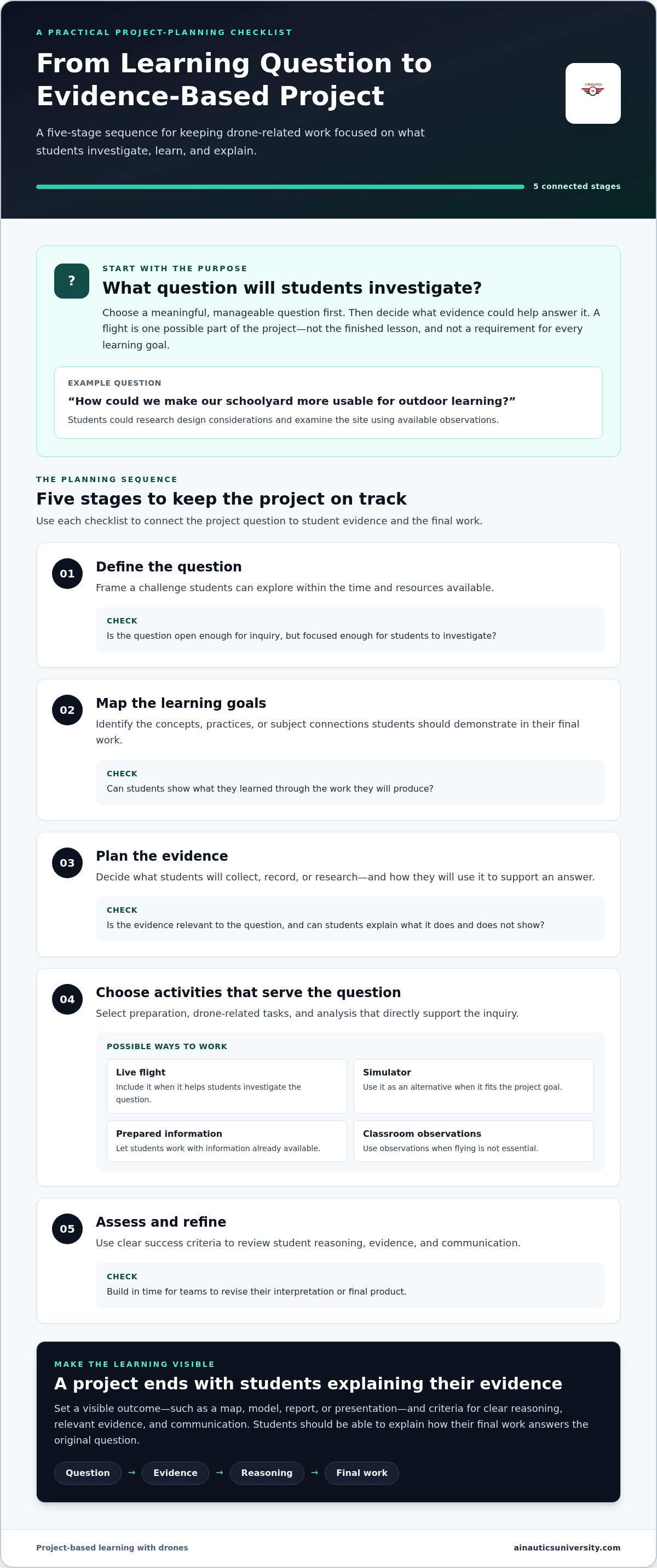
Choose an open but manageable question students can investigate through observation, research, or data. For example, “How could we make our schoolyard more usable for outdoor learning?” Students might research design considerations and examine a site using available observations. Decide early what they’ll produce, such as a map, model, report, or presentation, and set criteria for clear reasoning, relevant evidence, and communication before selecting activities.
Plan the project stages and evidence
Map the work from preparation to reflection. Each stage should prepare students for the next and contribute evidence they can interpret. Keep the essential tasks tied to the learning goal; treat live flight, simulation, and extended data analysis as options to use when they serve that goal and fit the project’s scope.
- Define the question. Frame a challenge students can explore within the available time and resources.
- Map learning goals. Identify the concepts, practices, or subject connections students should demonstrate in their final work.
- Plan evidence. Decide what students will collect, record, or research, and how they’ll use it to support an answer.
- Choose activities. Select preparation, drone-related tasks, and analysis that directly support the question. A live flight may be useful, but students can also work with a simulator, prepared information, or classroom observations when flying isn’t essential.
- Assess and refine. Use the success criteria to review student reasoning, evidence, and communication. Build in time for teams to revise their interpretation or final product.
Scale without losing purpose. A shorter project can focus on one focused question, a limited set of evidence, and a brief presentation. A longer project can add research, multiple rounds of observation, deeper analysis, and revision. For learners new to drone concepts, provide more structure and model how to document evidence. As students gain experience, offer more choice in methods and presentation. Educators developing their instructional readiness may find AINautics University’s Train-the-Teacher Program a useful support as they plan classroom learning.
Project-based drone learning examples across subjects
Use adaptable prompts to connect drone-related work to different subjects, then select the format that best fits the learning goal. The ideas below are starting points, not prescribed activities or guaranteed curriculum outcomes. Students might work with live observations, sample data, a simulator, or research, depending on readiness and classroom resources.
Connect drone projects to STEM, data, and technology
A mapping or observation question can support learning in science, math, geography, art, or computing. Data means information students collect or examine to find patterns and support an explanation. Digital systems are the connected tools and processes used to collect, store, or share information. Cybersecurity concerns protecting those systems and information. Keep the concepts at a level students can investigate and explain.
| Adaptable project question | Subject connection | Possible student evidence | Possible final product |
|---|---|---|---|
| How does the layout of a garden affect where plants receive sunlight? | Science, math, and geography | Site observations, labeled images, or a simple comparison of areas | An annotated map with a short explanation of the comparison |
| How can we represent a familiar space so another person can understand its layout? | Geometry, design, and visual communication | Measurements or observations used to compare a drawing with the space | A scaled model, map, or presentation explaining design choices |
| What information does an aerial image show clearly, and what might it leave out? | Media literacy, science, and data interpretation | Image annotations, questions about viewpoint, and comparisons with other observations | A visual analysis explaining the image’s uses and limits |
| How should a team think about protecting information in a drone-related digital system? | Information technology and cybersecurity | A diagram of information moving through a system and a list of possible protection questions | A systems diagram or short briefing that explains the team’s reasoning |
The cybersecurity prompt reflects a topic explored in a high school project-based IT and cybersecurity education study involving aerial drones, as summarized in the PMC research source. Keep the connection appropriately scoped: it shows a possible subject pairing, not a guaranteed result for every classroom. For broader project-based learning with drones, choose a question that suits student readiness and lets learners work with evidence they can understand.
Build communication and collaboration into the project
Give teams complementary responsibilities, such as researching the question, planning observations, organizing evidence, and preparing the presentation. Roles can rotate or be shared so students engage with more than one part of the inquiry. Match the final format to the goal: a map can make spatial patterns visible, while a report or presentation can make comparisons and reasoning easier to follow.
Before teams present, ask them to connect each conclusion to evidence. What did they observe? How did they interpret it? What remains uncertain? These prompts make collaboration purposeful and help students communicate findings without overstating what their information supports.
How to implement, guide, and assess a drone project
A strong project needs structure before students begin, guidance while they investigate, and time to reflect when they finish. Set the learning objectives and success criteria first. Then plan the activities, checkpoints, and assessment evidence that will help students stay on track without taking over their inquiry.
Project evidence is most useful when it directly shows what students were asked to learn. A polished final product matters, but it can’t replace evidence of how students reasoned, worked with information, and communicated their conclusions.
- Prepare the project. Confirm the learning objectives, deliverables, schedule, student roles, and resources. If a flight is planned, include applicable FAA guidance, school procedures, and safety considerations in the preparation.
- Launch the inquiry. Share the central question and explain what students will produce. Review the criteria they’ll use to judge their work.
- Check progress. Schedule brief reviews of team plans, observations, evidence, and developing explanations.
- Review the final work. Assess students’ process and deliverables against the stated objectives and criteria.
- Reflect and revise. Invite students to describe what they learned, what they would change, and what questions remain.
Guide teams while keeping student inquiry central
Use checkpoints to guide the work without supplying the answers. Ask teams to show how their plans connect to the project question, what their evidence suggests, and what they still need to find out. If observations challenge an early assumption, prompt students to reconsider their explanation: “What does the evidence support? What else could account for it?”
Assign complementary responsibilities for research, planning, evidence review, and presentation. Clarify how each role contributes, and give students chances to share their reasoning with teammates. These routines help educators notice when a group needs support, while keeping decisions and interpretation in students’ hands.
Assess process, evidence, and reflection
Build a rubric from the learning objectives and project deliverables, not from the novelty of the equipment or whether a flight took place. Gather evidence across the work: students’ planning notes, explanations during checkpoints, contributions to teamwork, use of evidence, and final communication. This gives you a fuller view than a final product alone.
- Process: Did students plan and make decisions that fit the inquiry?
- Evidence: Can they explain what they observed and how it supports their conclusion?
- Collaboration: Did team members contribute and respond to one another’s ideas?
- Communication: Does the final product make the reasoning understandable?
Close with reflection. Ask students what changed in their thinking, which evidence was most useful, and what they would improve in a future investigation. Educators building confidence in planning and guiding drone learning can explore AINautics University’s Train-the-Teacher Program as a resource for instructional readiness.
How AINautics University can support project-based learning with drones
Educators don’t need to turn every project into a full drone program to make the learning meaningful. A clear question, relevant evidence, and thoughtful guidance can anchor the work. Support becomes useful when it helps teachers connect hands-on activities to curriculum goals, build confidence with UAS concepts, or give students a way to explore the technology beyond a single classroom activity.
Start by identifying the part of the project that needs support. Is it educator readiness, a way to introduce flight concepts, or a next step for students who want to explore UAS further? Match resources to that need, then keep the project’s learning goals at the center. A simulator, mobile lab experience, or training program can add options, but none is a prerequisite for purposeful inquiry.
Build educator confidence through guided preparation
AINautics University’s Train-the-Teacher Program supports educators integrating autonomous systems into learning. Teacher preparation can help instructors plan how hands-on activities connect to intended outcomes and how to guide students through investigation. Curriculum development and state and district standards alignment can also help educators situate UAS learning within broader instructional goals.
Simulation and virtual reality can offer additional ways to explore drone concepts. AINautics University’s Drone Simulator and VR Trailer Mobile Lab support immersive learning experiences, which may be useful when a project includes a technology exploration component. They remain optional approaches, not requirements. Educators interested in how simulation and VR fit into UAS education can explore immersive drone training technology.
For example, a class might use a simulator as one activity within a broader inquiry, then focus its assessment on the students’ explanations and project evidence. Another class might not need simulation at all. Choose learning experiences based on the question, student readiness, instructional time, and available resources.
Connect student projects with continued UAS learning
Some students may want to continue exploring UAS after a class project ends. AINautics University’s UAS Student Scholars program supports student drone education and can be a relevant pathway for interested learners. Introduce continued learning as an invitation, not an expected outcome of every project. The UAS scholarship and high school career pathway guide offers related context for students considering further opportunities.
For educators, the practical next step is to identify one learning goal and consider which support, if any, would help bring it to life. Explore AINautics University programs to find options that align with your classroom’s instructional needs and students’ interests.
Turn one classroom question into a path forward
A first project can help your school decide where drone learning belongs next. Look at upcoming units and identify a point where students could revisit a topic from a new angle, or where an existing lesson could grow into a longer investigation. This creates room to build on classroom experience instead of treating each project as a one-time event.
As you plan what comes next, consider how students’ interests and your instructional priorities might shape future opportunities. A project can be a starting point for wider conversations about how emerging technology fits into learning, and how educators can keep adapting their approach as students’ questions evolve. The direction can develop over time, at a pace that suits your learning community.
Explore AINautics University’s drone education programs as you consider a next step for your school. Keep moving forward with curiosity and a clear sense of purpose.
Frequently Asked Questions
Can project-based learning with drones work without outdoor flights?
Yes. A class can explore a drone-related scenario through a paper-based mission storyboard. Give students a fictional task and ask them to sketch the sequence of decisions they’d make, note what information they’d want, and identify questions they can’t answer from the scenario alone. This makes the project accessible without assuming access to a particular tool or setting, while giving students a concrete way to examine how the technology might be used.
What subjects can students learn through drone projects?
Drone projects can connect to several subjects, depending on the lesson’s focus. For a civics connection, students might examine a hypothetical proposal to use aerial images in community planning and write a brief weighing different community perspectives. They could draw on social studies, reading, and persuasive writing. A research paper on a high school Summer Academy provides a bounded example of aerial drones in IT and cybersecurity education; educators should choose subject links that fit their own objectives.
How do you assess students in a drone project?
Use a mix of team and individual checks so a strong group product doesn’t obscure what each student understands. After a team completes its work, ask each learner to annotate one decision the team made and explain its reasoning in their own words. You can compare those responses with the project criteria and use them to identify where students may need clarification or an additional challenge.
Do students need drone experience before starting a project?
No prior drone experience is necessary. Offer a short vocabulary bank or picture glossary so students can understand unfamiliar terms as they arise, without turning the project into a technical test. If some learners already know more, invite them to contribute questions or help explain concepts, while ensuring every student has a meaningful role. This lets the class begin from different levels of familiarity without assuming a shared background.
How can teachers keep a drone project focused on learning?
Create a brief project charter before work begins. State the central purpose, what falls outside the project’s scope, and how students will know they’ve completed the work. Keep a separate “questions to explore later” space for interesting technology tangents. That way, students can preserve their curiosity without letting every new question redirect the class. Review the charter when planning lessons or deciding whether to add an activity.
Can drone projects help students explore UAS career pathways?
Yes. A project can prompt students to investigate the range of work connected to UAS without suggesting it guarantees employment. Invite students to choose a role, such as data analyst or mapping technician, and research the kinds of questions that role might help answer. They can then connect that research to the work their class completed and identify what they’d like to learn next.

Article by
AINautics University Team
The team behind AINautics University, dedicated to drone education and FAA Part 107 certification prep, VR flight simulation, and STEM training programs for students and educators.


