
A drone activity can be appropriate in one learning space and unsafe in another. A risk assessment for educational drone use helps educators look beyond the aircraft to consider students, supervision, bystanders, and changing conditions. A repeatable process makes it easier to identify relevant hazards and turn safety guidance into routines a class can follow.
This checklist helps you identify hazards, choose controls, and make a reasoned decision to proceed, modify, postpone, or stop before flight. It also gives students a role in recognizing risks and following clear procedures, rather than simply waiting for instructions.
Work through the key questions about the learning environment, student roles, and people nearby, then connect each concern to an action. Scenario-based practice with the AINautics Drone Simulator can help students rehearse decisions before a live activity. AINautics University’s Train-the-Teacher Program supports educators in making safety routines teachable and consistent. The aim is a plan you can reuse and adapt when a lesson changes.
Key Takeaways
- A risk assessment for educational drone use provides a repeatable way to connect activity hazards with practical controls and informed decisions.
- Start with the learning goal, participants, aircraft, setting, and flight boundaries. These factors can change from one activity to the next.
- Choose controls that reduce exposure, assign responsibility for each action, and define when conditions require a review.
- Organize activity-day checks around preparation, site readiness, student briefing, supervision, and a short review afterward.
- Build consistency through staff training and scenario practice, helping students develop safe habits alongside meaningful UAS skills.
What Should a Risk Assessment for Educational Drone Use Cover?
A risk assessment for educational drone use is a structured review of a planned activity. It identifies what could cause harm, who or what could be affected, which controls can reduce the risk, and what risk remains after those controls are in place. The purpose is not to eliminate every uncertainty. It is to make hazards visible and support a deliberate decision about how to proceed.
Keep the assessment practical and specific. A school’s overall drone program plan can establish shared routines, roles, and expectations. An activity-level assessment applies those routines to a particular lesson, site, or event. For example, the program plan might explain how staff prepare and supervise drone activities, while the lesson assessment records what changes for a different space, learning objective, group, or setup.
The assessment supports planning, but it does not replace applicable FAA requirements or school and district policies. Review current guidance and local policies as you prepare an activity. Treat the assessment as a living document: update it when participants, equipment, surroundings, or conditions change, and reconsider the plan if a control no longer works as intended.
Which educational drone activities need a fresh assessment?
Consider each activity on its own terms: a classroom demonstration, a Drone Simulator session, a supervised practical flight, or a public-facing event. Simulation and live flight have different hazards. A demonstration may also involve a different audience and setup than a student-led exercise. A new location, participant group, learning objective, or operating arrangement can change what needs attention. Assess indoor and outdoor activities separately rather than assuming one checklist fits both.
Who contributes to a school drone risk assessment?
The educator or program lead planning the activity should coordinate and record the assessment. Involve supervising staff and relevant school decision-makers so the plan reflects how the activity will run and fits school expectations. Give students an age- and role-appropriate part in recognizing hazards, understanding boundaries, and speaking up when something changes. Student participation builds safety awareness; it does not shift planning responsibility away from the adults leading the activity.
A useful assessment connects each concern to an action and a person responsible for carrying it out. Record the activity, setting, participants, hazards, chosen controls, remaining risk, and circumstances that would prompt a review. This gives staff a clear reference before and during the lesson, while showing students that safe practice is part of learning to use UAS responsibly.
How to Identify Drone Activity Hazards Before Students Fly
Begin with the learning purpose, then describe how the activity will happen. Who will participate and supervise? What will the aircraft do? Note the aircraft and its condition, the environment, and the planned flight boundaries. A coding demonstration, supervised flight, and public-facing event can expose people to different risks, even when they use the same drone.
A hazard is a condition that could contribute to harm to a person, property, equipment, or privacy. For each hazard, record who or what could be affected and how harm might occur. For example, a busy walkway near the activity area could expose passersby to an unexpected drone movement. A damaged propeller could affect safe operation and put nearby participants at risk. A camera may also raise privacy concerns if people or personal information enter its view.
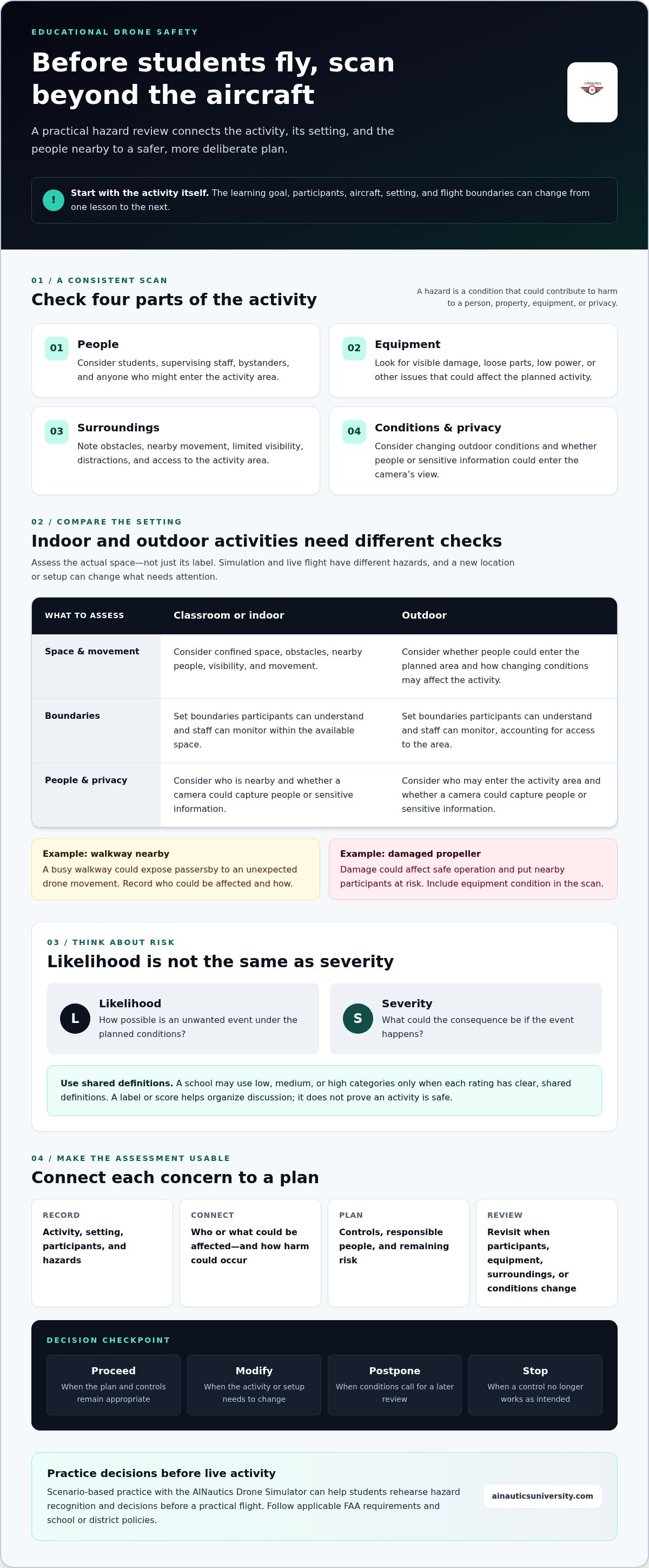
Use a consistent scan to avoid focusing only on the aircraft:
- People: Consider students, supervising staff, bystanders, and anyone who might enter the activity area.
- Equipment: Look for visible damage, loose parts, low power, or other issues that could affect the planned activity.
- Surroundings: Note obstacles, nearby movement, limited visibility, distractions, and access to the activity area.
- Conditions and privacy: Consider changing outdoor conditions and whether the activity could capture people or sensitive information.
What changes between classroom, indoor, and outdoor activities?
Assess the actual space, not just its label. In a classroom or other indoor setting, consider confined space, obstacles, nearby people, visibility, movement, and whether participants can remain separated from the activity. For outdoor plans, consider how environmental conditions may change and whether people could enter the planned area. Set boundaries participants can understand and staff can monitor. For regulatory context, consult the FAA’s guidance for educational drone use alongside applicable school policies.
How should schools compare likelihood and severity?
Likelihood describes how possible an unwanted event is under the planned conditions. Severity describes the potential consequence if it happens. A school may use low, medium, or high categories, but only if it has clear, shared definitions for each rating. A label or score helps organize discussion; it does not prove an activity is safe. Use judgment, consider who could be affected, and revisit the assessment if conditions or controls change.
Scenario practice can help students recognize hazards before a practical activity. The AINautics Drone Simulator supports scenario-based learning that educators can use to build decision-making skills before students fly.
How to Choose Controls for Educational Drone Risks
Choose controls that address a specific hazard, not just a general sense of caution. The most direct options remove the hazard or reduce people’s exposure to it. For example, changing the activity layout or keeping others out of the operating area can reduce exposure more directly than relying only on a reminder to stay clear. Briefings matter, but they should support practical safeguards rather than carry the whole plan.
Record each decision so staff know what needs to happen, who is responsible, and what change should prompt a review. Use a table like this in your risk assessment for educational drone use:
| Hazard | Affected people | Control | Responsible person | Review trigger |
|---|---|---|---|---|
| People entering the activity area | Students, staff, visitors | Define the boundary and supervise access | Activity lead | Someone enters or the boundary can’t be maintained |
| Unclear student roles | Students and supervising staff | Assign roles and explain responsibilities before the activity | Educator | Participants or roles change |
| Equipment concern | Nearby participants | Complete a readiness check; don’t use equipment with an unresolved concern | Person assigned to the check | Damage or another concern is noticed |
Before relying on a control, ask whether it is practical in the actual setting, visible to the people who need to follow it, clearly understood, and compatible with the learning objective. A boundary that is hard to see or supervise may not work as intended. Brief participants on boundaries, assigned responsibilities, and how to pause or stop the activity. Base emergency arrangements and safeguarding escalation on the school’s established procedures.
Then reassess the risk that remains with the controls in place. Record whether the activity can proceed as planned, should be modified, needs to be postponed, or must stop. If a control cannot be applied or conditions change, revisit the decision rather than treating the original assessment as permanent.
How can simulation support safer preparation?
Simulation lets learners rehearse decisions and respond to scenarios before a practical activity. The AINautics Drone Simulator can support this scenario-based practice and help students become familiar with choices they may need to make. It complements, but does not replace, assessment of the real activity, site, participants, and conditions. AINautics University’s Train-the-Teacher Program also supports educators in developing consistent, teachable routines for integrating autonomous systems into learning.
Match each control to a hazard, assign a responsible person, and revisit the plan when its assumptions change. This turns safety measures into clear, teachable actions.
How to Use a Drone Risk Assessment Checklist on Activity Day
A checklist turns the assessment into a working routine. Use it to confirm that the activity still matches its documented purpose, planned boundaries, assigned roles, and controls. Assign each check to a staff member and record completion so the team can see what has been verified and what still needs attention.
Revisit the risk assessment whenever people, equipment, or conditions change. If an assumption the plan depends on no longer holds, pause and decide whether to modify, postpone, or stop the activity. A completed checklist is not permission to continue regardless of circumstances.
What belongs on a before-flight checklist?
Organize checks in a consistent sequence, from preparation through site readiness and participant briefing. Include these prompts and adapt them to the activity and school procedures:
- Planning: Does the activity match its documented purpose, boundaries, roles, and controls?
- Site readiness: Are the activity area and access arrangements as planned? Have conditions or nearby activity changed?
- Equipment and participants: Has the assigned person completed the readiness check? Do participants understand their roles, boundaries, and stop instructions?
- Guidance and procedures: Have staff reviewed current FAA guidance and applicable school or district procedures for this activity?
Record who completed each check and any changes made. If a required control cannot be put in place, do not mark the activity ready by default. Reassess and make a clear decision before proceeding.
What should staff monitor during and after the activity?
During the activity, keep checking whether conditions still match the assessment. Watch for environmental changes, people entering the area, boundary issues, participants who are not ready, or controls that are not working as intended. Staff should know who can call a pause and how to communicate it. If the situation changes, pause first. Then decide whether a revised plan can address it or whether the activity should stop.
Afterward, record incidents, near misses, unexpected changes, and lessons for the next assessment. A short review may reveal that a boundary was difficult to monitor or instructions need to be clearer. Update the routine instead of relying on staff to remember what happened last time. This documented cycle makes a risk assessment for educational drone use useful beyond a single lesson.
AINautics University’s Train-the-Teacher Program supports educators in making safety routines teachable and consistent.
Build a School Drone Safety Process With Training and Review
A reliable school drone safety process turns individual assessments into a consistent learning routine. Staff training builds shared understanding, written templates make planning repeatable, and periodic review keeps the process aligned with the activities a school actually conducts. When educators use the same clear terms for hazards, controls, responsibilities, and stop decisions, students receive consistent expectations across lessons.
Keep the process straightforward: use a common template, assign responsibilities, and discuss realistic scenarios as a team. For example, ask what staff would do if a participant no longer understands a boundary or the planned activity needs to change. These short conversations help educators practise decisions before they need to make them in real time. A risk assessment for educational drone use is not paperwork for its own sake. It is a practical routine that supports thoughtful instruction and responsible student participation.
How can educators build confidence without overcomplicating the process?
Start with a template staff can complete and students can understand. Use consistent language, make roles explicit, and hold brief scenario discussions that connect written controls to classroom decisions. AINautics University’s Train-the-Teacher Program supports educators integrating autonomous systems into curricula. The VR Trailer Mobile Lab offers an immersive educational experience that can support learning alongside activity-specific planning and school procedures.
Training pathways can also connect safe practice with longer-term UAS learning. AINautics University’s Part 107 Training and Self-Paced Certification support certification learning, while UAS Student Scholars supports student learning pathways. These options complement classroom routines: preparation helps students build knowledge, and careful assessment helps them apply it responsibly.
What should a school review after each activity?
Compare the plan with what happened. Did the controls work as intended? Did participants follow their roles and boundaries? Did anything change unexpectedly? Record useful observations, including near misses or points of confusion, and decide whether the template, briefing, or staff preparation needs adjustment.
Revisit the assessment when the activity design, participants, equipment, or setting changes. A routine built for one lesson should not be carried forward unchanged if its assumptions no longer fit. Keep the review focused on practical improvements, and consult current applicable FAA guidance and school or district procedures when preparing activities.
Adopt a reusable checklist, prepare staff to use it consistently, and make review part of the learning cycle. To explore educator and student learning pathways, visit AINautics University’s learning programs.
Make Safe Drone Learning a Repeatable Practice
A strong risk assessment for educational drone use connects activity-specific hazards to practical controls, clear responsibilities, and a decision to proceed, adapt, postpone, or stop. Use a checklist to guide planning and activity-day checks, then review what happened and update the process when conditions or lessons change.
Consistency comes from prepared educators and meaningful student practice. AINautics University’s Train-the-Teacher Program supports educators integrating autonomous systems into curricula. The AINautics Drone Simulator helps learners practise scenarios, while the VR Trailer Mobile Lab and UAS Student Scholars program support broader UAS learning pathways.
Start with one upcoming activity: document its purpose, assign responsibility for key checks, and review current applicable guidance and school procedures. Then build on what your team learns. Explore AINautics University’s educational programs to support educator preparation and student learning. With clear routines and thoughtful review, your school can help students build safe habits alongside skills for the future.
Frequently Asked Questions
What should a school drone risk assessment include?
Include the activity’s purpose, participants, equipment, setting, identified hazards, people who could be affected, planned controls, and the staff responsible for each check. Record the decision to proceed, modify, postpone, or stop, along with conditions that would trigger a pause. Review a risk assessment for educational drone use when the activity or its circumstances change, and align it with current FAA guidance and applicable school or district procedures.
Who is responsible for assessing risks before students use drones?
The school should identify a program lead to coordinate and document the assessment, involving staff who will plan and supervise the activity. Relevant school decision-makers can contribute when site procedures, safeguarding, or student participation are involved. Put responsibilities in writing so everyone understands their role. Students can learn to spot hazards and follow boundaries appropriate to their participation, while staff oversee planning and the activity according to school procedures.
How often should a school update its drone risk assessment?
Review the assessment before the planned activity and whenever an important assumption changes. A different setting, participant group, aircraft, flight boundary, or environmental condition may affect the hazards and controls. Incidents and near misses are also reasons to revisit the plan. An earlier assessment can inform a repeat activity, but do not treat it as permanently valid if circumstances have changed or a control no longer works as intended.
Can students fly drones indoors at school?
Assess indoor drone use for the specific space, activity, participants, obstacles, boundaries, and supervision. Consider how people will remain separated from the activity and how staff will monitor the area. A controlled indoor setting does not remove the need to identify hazards or define when to pause. Follow current school procedures and applicable requirements, and document why the chosen controls fit the lesson and the people in the space.
Does an educational purpose determine which FAA rules apply?
No. An educational purpose alone does not establish that a flight is exempt from applicable requirements. Which FAA framework applies can depend on the operation and its circumstances. Before planning flight activity, review current FAA guidance and applicable school procedures rather than relying on an outdated summary or assumption. This article provides a planning framework for identifying and managing risks; it does not determine which rules apply to a particular flight.
What should a school do if conditions change during a drone activity?
Pause and compare the new conditions with the assessment. Check whether boundaries, supervision, and other controls can still be maintained, then decide whether to continue, modify, postpone, or stop. If a control is no longer effective, the original decision to proceed is not enough to justify continuing. Record significant changes and any resulting decisions, incidents, or near misses so staff can use those lessons in future activity planning.
How can drone simulators support educational safety training?
Simulators can help students and educators practise decisions and discuss scenarios before practical activities. Rehearsing a situation can make safety concepts easier to explore, but simulation does not replace assessment of the actual setting, participants, equipment, and controls. The AINautics Drone Simulator supports simulation and scenario-based training as part of a broader educational approach. Educators can use it to prepare learners to think through choices before they encounter a live activity.

Article by
AINautics University Team
The team behind AINautics University, dedicated to drone education and FAA Part 107 certification prep, VR flight simulation, and STEM training programs for students and educators.


