
A virtual flight can build real preparation, but it can’t replace real-world flying. If you’re wondering whether a VR drone simulator experience is serious learning or just an immersive way to play, the answer depends on how it’s used. Simulation gives learners a space to practise control, orientation, and decision-making before exploring those concepts with a real aircraft.
That practice has limits. A headset can’t reproduce every condition, responsibility, or sensation of flying outdoors, so simulation works best as one part of a broader UAS learning journey. This article explains what students can practise, where simulation falls short, and how educators can connect immersive activities to classroom instruction. AINautics University’s Drone Simulator and VR Trailer Mobile Lab support immersive drone education, while Part 107 Training helps learners build regulatory knowledge alongside practical skills.
Key Takeaways
- Set one clear learning goal for each VR drone simulator experience so learners know what to notice and discuss.
- Use repeated virtual tasks to explore control, awareness, and decision-making, then reflect on what to learn next.
- Compare VR and desktop simulation by the lesson’s purpose and how learners will interact with the activity.
- Connect immersive practice to classroom concepts with a sequence: introduce, practise, debrief, and choose a next step.
- Explore how AINautics University’s Drone Simulator and VR Trailer Mobile Lab can support broader UAS learning.
What Is a VR Drone Simulator Experience, and What Should You Expect?
A VR drone simulator experience is guided practice in a virtual flight environment. A learner takes part in a simulated drone task, interacts with the scenario, and considers what happened. The setting may feel immersive, but learning comes from connecting actions to ideas, not simply putting on a headset.
In short, drone simulation is practice with a virtual aircraft, not a real flight or proof of real-world flying ability. Setting that expectation helps students and educators choose suitable learning goals. Simulation offers a space to explore concepts, while actual aircraft operation involves conditions and responsibilities a virtual activity may not reproduce.
How Does a VR Drone Simulator Experience Work?
The learner enters a virtual setting, works through a task, then reviews the experience with a teacher, facilitator, or learning prompt. A task might ask them to observe what is happening, make a choice, or try a control input. Controls and scenarios depend on the learning setup, so there isn’t one standard format.
Review turns the activity into a lesson. Ask what the learner noticed, what they chose to do, and what they would investigate next. An example from outside VR is AirSim, an open-source drone simulator, which shows how simulation can support drone testing and research. It is an example of a simulator, not a claim that every drone simulator uses VR.
Who Can Benefit From Immersive Drone Learning?
Students curious about drones or unmanned aircraft systems (UAS) can use an immersive activity as an introduction to flight concepts. They don’t need to know technical vocabulary beforehand. Educators can explain terms as they arise, link learners’ choices to classroom topics, and help students explore future UAS pathways.
Immersive learning is more than an activity with engaging graphics. A drone video game may focus on entertainment, challenge, or points. A learning activity gives students a defined task and a reason to reflect on their decisions. The difference is how the experience is framed and discussed.
After a virtual task, for example, a class might identify what information helped them decide what to do, or note a term they want explained. These prompts focus attention on observation and reasoning rather than just finishing the activity. They also make it easier for beginners to ask questions before tackling more complex ideas.
Educators can connect simulation to a broader UAS curriculum by introducing a concept, giving students time to practise, and leading a short debrief. AINautics University’s Drone Simulator and VR Trailer Mobile Lab support immersive learning in educational settings. Used thoughtfully, these resources can help students explore drone concepts and identify questions for further instruction, without presenting virtual practice as a substitute for real-world flight learning.
How VR Drone Simulation Builds Skills Through Structured Practice
Virtual practice is more useful when learners have a clear objective and a chance to repeat a task. Repetition lets students pay closer attention to what they notice, which actions they choose, and what questions arise. The goal isn’t to promise that virtual practice will translate directly into real-flight performance. It is to create a structured opportunity to explore concepts before applying them in other learning settings.
A well-planned VR drone simulator experience can support several parts of learning:
- Foundational awareness: Notice what is happening in a simulated setting and identify relevant information.
- Control practice: Explore the relationship between an input and the response shown in the simulation.
- Decision-making: Consider options, make a choice, and explain the reasoning behind it.
- Reflection: Review what happened and identify what to practise or learn about next.
Simulation creates practice opportunities, not proof of real-flight proficiency. A virtual environment can’t establish how someone will respond to every real-world condition. Keep this distinction in mind when setting learning goals or assessing progress.
What Can Learners Practise in a Drone Simulator?
Depending on the simulator and learning setup, students can explore general flight concepts and become familiar with the sequence of a task. An instructor might ask them to focus on one idea, such as observing before acting, then describe how their choices shaped the simulated task. Shenandoah University’s VR drone assembly tool offers an example of using VR for a practical drone-related learning activity.
Make observations specific. Ask students to record what they tried, what they noticed, and what remains unclear. Their notes give the class a starting point for discussion without treating a successful virtual attempt as evidence of real-world skill.
Why Reflection Matters After Virtual Practice
Set a learning goal before the activity and reserve time for a short debrief afterward. Instructors can connect learners’ observations to classroom concepts, explain unfamiliar terms, and identify a useful next step. Try questions such as:
- What were you trying to learn or accomplish?
- What information shaped your decisions?
- What felt challenging, and what would you like explained?
- Which concept should you explore or practise next?
This approach keeps attention on reasoning, not just task completion. For a wider look at immersive tools in UAS education, Immersive Drone Training Technology: Shaping the Future of UAS Education in 2026 explores how they can fit into a learning program. AINautics University’s Drone Simulator learning resource can also support a structured learning journey.
VR Drone Simulator vs. Desktop Simulation vs. Real-World Flight
Choosing a learning format isn’t about finding one universal winner. VR, desktop simulation, and real-world flight create different learning contexts. The right fit depends on what students are meant to explore, how they’ll interact with the activity, and what instruction surrounds it.
VR simulation: Places the learner in an immersive virtual setting. It may make a simulated task feel more immediate, but immersion alone doesn’t show that learning is better.
Desktop simulation: Presents a simulated activity on a screen. This format can suit lessons where the focus is on the task rather than feeling surrounded by a virtual setting.
Real-world flight: Involves an actual aircraft in a real environment. It provides practical experience that virtual formats can’t reproduce and should be approached with appropriate instruction.
Simulation and real flight play complementary roles: one offers a controlled space to explore ideas, while the other involves operating an aircraft in the real world. A VR drone simulator experience can be one step in a learning sequence, not a substitute for every other form of preparation.
What VR Adds Compared With Screen-Based Simulation
VR changes how a learner experiences a simulated setting. Instead of viewing the activity only on a screen, the learner engages with a virtual environment. That may make the activity feel more immersive, but it doesn’t prove stronger understanding or better performance. A desktop simulation may be just as suitable for a particular lesson.
Start with the learning goal. If students need to discuss a concept together, choose the format that best supports the instruction. If the aim is to let learners explore an activity from within a virtual setting, VR may fit. The task, the learners, and the educator’s guidance matter more than choosing a format because it seems more advanced.
What a Simulator Cannot Replace
A simulator doesn’t give learners experience handling an actual aircraft in a real environment. It can’t stand in for every practical consideration involved in real flight, and completing a virtual task shouldn’t be treated as evidence that someone is ready to fly independently. Connect simulation to appropriate instruction and practical learning opportunities.
Educators can make the limits clear by discussing what a virtual activity leaves out, then identifying what learners need to understand or practise in another setting. This keeps expectations grounded and positions simulation as one component of a broader UAS education pathway.
For questions about FAA certification or training requirements, consult current FAA guidance and relevant training materials. Keep certification preparation distinct from simulator activities, and use each learning resource for its intended purpose.
How Students and Educators Can Make a VR Drone Experience Useful
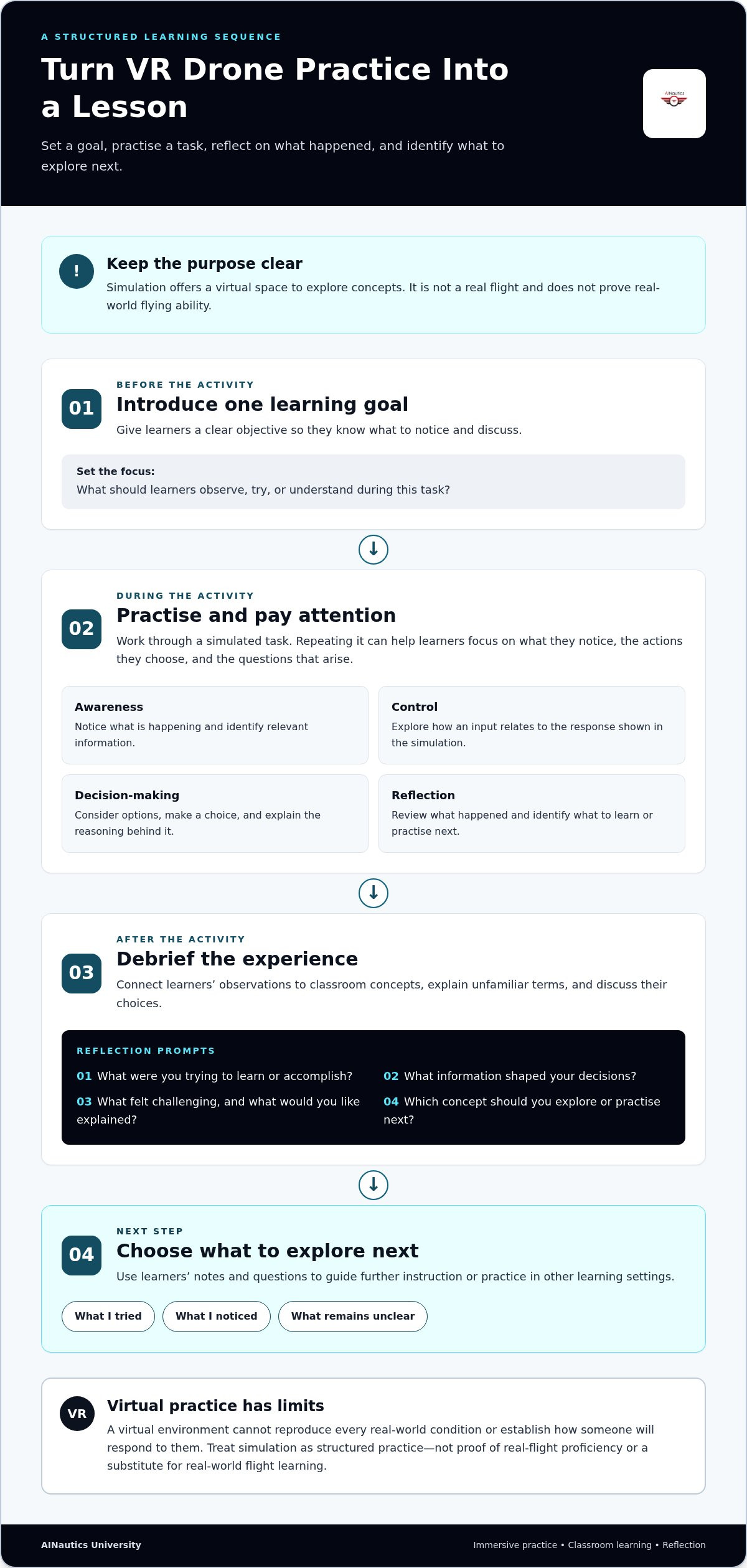
A purposeful activity starts before learners enter a virtual setting. Decide what students should notice or understand, connect the experience to a lesson, and leave time to discuss what happened. This keeps a VR drone simulator experience tied to learning goals instead of making it a standalone attraction.
A Simple Learning Sequence for Students
Keep the objective manageable. Rather than asking beginners to tackle several technical ideas at once, give them one clear focus, such as noticing what information they use to make a decision. After the activity, invite them to describe what they observed, what they chose, and what they’d like to understand better. Their reflections can guide a class discussion or the next step in drone learning.
- Set a goal: State one accessible idea or question to focus on.
- Introduce the concept: Explain key terms learners need to follow the activity.
- Practise: Let students engage with the virtual task while keeping the goal in view.
- Debrief: Ask what they noticed, which decisions they made, and what raised questions.
- Choose a next step: Identify a related concept to study, discuss, or explore through guided drone learning.
Students can keep brief notes during or after the experience. Useful prompts include: “What did I notice?”, “What influenced my decision?”, “What would I ask my teacher?”, and “Which idea do I want to investigate next?” These questions turn the activity into something learners can revisit, rather than relying on memory alone.
Planning an Immersive Activity for a Class
Start with curriculum goals and student questions, then decide how an immersive activity might support them. If a lesson focuses on observation and decision-making, for example, ask students to track what information they use and explain their choices afterward. Keep the introduction and discussion tied to the lesson so VR supports the curriculum rather than replacing it.
Plan for reflection as deliberately as for the activity itself. A short written response, pair discussion, or class debrief can show what learners understood and where they need clarification. Introduce technical terms when they become relevant, and invite students to connect their observations to concepts already covered in class.
Educators building drone activities into a broader classroom plan can explore Drone Curriculum for Educators: A Comprehensive Guide to Classroom Integration. AINautics University’s Train-the-Teacher Program supports educators developing their approach to drone learning.
AINautics University’s drone education resources can help educators connect immersive practice with a broader UAS learning pathway.
Explore AINautics University's VR Drone Simulator Experience
For students and educators, immersive technology is most useful when it connects to a broader learning goal. AINautics University’s Drone Simulator and VR Trailer Mobile Lab bring drone concepts into educational settings. They can complement classroom instruction and educator support as part of an introduction to unmanned aircraft systems (UAS), rather than being treated as a complete course on their own.
The value of a VR drone simulator experience isn’t simply that it feels different from a typical lesson. It gives learners an engaging context for exploring ideas, while an educator helps connect the activity to questions about drones, autonomous systems, and future study. Context, reflection, and a clear next step are what make the experience useful.
How the VR Trailer Mobile Lab Fits Into UAS Education
The VR Trailer Mobile Lab brings immersive learning experiences to education settings. Educators can use it to introduce drone and autonomous-systems concepts in a format that prompts curiosity and discussion. The educational value comes from how the activity fits the lesson, not from assuming that immersion alone will teach a concept.
Before an immersive activity, identify the question you want learners to consider. It might be how people interact with drone technology or what students want to understand about UAS. Afterward, invite learners to share observations and questions, then connect those ideas to classroom instruction. This gives the experience a purpose without assuming particular equipment, scenarios, or outcomes.
This approach can welcome students with different levels of familiarity. Introduce unfamiliar terms when they become relevant and give learners room to ask questions. AINautics University’s Train-the-Teacher Program supports educators developing drone learning for their students.
Connect Simulation With a Broader Drone Learning Path
Interest sparked by a simulator can lead to further study, but it doesn’t establish certification eligibility or count as certification credit. Students curious about operating drones for work can explore FAA Part 107 knowledge and structured preparation. AINautics University’s Part 107 Training helps learners build their understanding of certification topics. The article Professional FAA Part 107 Drone Training: The Ultimate 2026 Certification Guide provides further context on how certification study fits into a broader UAS learning journey.
Choose a next step that matches your goal, whether that means exploring drone concepts in class or learning more about certification preparation. AINautics University offers Part 107 Training, Self-Paced Certification, a UAS Student Scholars program, and educator resources to support different learning goals.
Turn Curiosity Into Your Next UAS Learning Goal
Let curiosity guide what you learn next. After a VR drone simulator experience, write down one question that stayed with you and one topic you’d like to understand better. That question can start a classroom discussion, independent study, or conversation about future pathways in unmanned aircraft systems (UAS). Small, intentional steps can turn an engaging activity into lasting interest.
Students can explore how drone knowledge connects with technology, safety, and problem-solving. Educators and families can help learners identify useful next steps and encourage them to keep asking questions as their understanding grows. There’s no need to map out an entire career path at once. Start with the idea that interests you most, then build from there.
Ready to choose your next learning step? Explore AINautics University’s drone learning resources, including simulator-based learning, Part 107 Training, and programs for students and educators.
Frequently Asked Questions
What is a VR drone simulator experience?
A VR drone simulator experience is a learning activity in which a student engages with a simulated drone task in a virtual setting. The name alone doesn’t explain how the activity is taught or assessed. To judge its educational value, look for a stated learning objective and a way to connect the task to a subject, skill, or question students can continue exploring.
Can a VR drone simulator teach you to fly a real drone?
It can introduce concepts and provide virtual practice, but it can’t establish that a learner is ready to operate a real aircraft. Treat it as one part of preparation. Before moving from simulation to aircraft practice, learners should follow appropriate instruction and understand how the next learning step will be supervised. For certification or regulatory requirements, use current FAA guidance rather than assuming simulator activity qualifies.
Is a VR drone simulator useful for beginners?
Yes. Beginners can use it to discover which parts of drone learning interest them, even if they haven’t studied aviation or technology before. A student might become curious about how drones are used in different fields or decide to learn more about operating them. Parents and educators can help turn that interest into a manageable next question without expecting learners to know technical terminology in advance.
What is the difference between a VR drone simulator and a desktop simulator?
The main distinction is how the simulated activity is presented and experienced. The interaction varies by learning setup, so there isn’t one control method or equipment arrangement that applies to every simulator. For a practical comparison, consider the lesson’s purpose, how the instructor will guide learners, and how students will share what they learn. Those criteria are more useful than assuming one format suits every class or learner.
Do VR drone simulator hours count toward FAA Part 107 certification?
Don’t assume simulator hours meet a formal Part 107 certification requirement. Check current FAA guidance for the requirements that apply to your situation, and keep educational simulator activity separate from formal eligibility or certification criteria. If you’re preparing for the knowledge test, AINautics University’s Part 107 Training is a relevant study resource. Use it to build your understanding while relying on FAA materials for official requirements.
Can schools use a VR drone simulator in the classroom?
Yes, schools can incorporate immersive drone activities into classroom learning. To connect the activity to course goals, decide in advance what student work will demonstrate learning, such as explaining a relevant concept or using course vocabulary in context. This lets educators assess understanding beyond participation alone. AINautics University’s VR Trailer Mobile Lab and Train-the-Teacher Program support educators exploring immersive drone education.
What should learners do after a VR drone simulation?
Choose a follow-up that matches the learner’s interests and role. A student exploring future UAS study can learn about AINautics University’s UAS Student Scholars program. Someone preparing for certification can explore Part 107 Training or Self-Paced Certification, while an educator developing classroom practice can look into the Train-the-Teacher Program. These are different pathways, so choose the one that fits the learner’s next goal rather than treating every simulation as a step toward certification.

Article by
AINautics University Team
The team behind AINautics University, dedicated to drone education and FAA Part 107 certification prep, VR flight simulation, and STEM training programs for students and educators.


