

What if your drone is below its maximum takeoff weight but still isn’t properly balanced? Total weight tells you how heavy the aircraft is; balance tells you how that weight is distributed. Both matter before flight, which is why drone pilot load balancing calculations are an essential part of payload planning. A load can meet the weight limit and still fall outside the manufacturer’s balance guidance.
This guide walks through a repeatable way to assess the aircraft, battery, and payload together. You’ll learn how to total the mass, calculate moments and center of gravity when the manufacturer provides the necessary reference information, and compare your results with the aircraft’s limits. You’ll also learn how to secure the payload, verify the setup before takeoff, and know when to pause and review the aircraft’s documentation.
For learners building broader piloting knowledge, AINautics University’s Part 107 training and Drone Simulator provide educational resources alongside careful ground-based planning. Start with the numbers, verify the placement, and make the manufacturer’s limits part of every preflight decision.
Key Takeaways
- Separate total loaded mass from how that mass is positioned; each check answers a different safety question.
- Use drone pilot load balancing calculations to assess component masses and positions, following the aircraft’s manufacturer guidance.
- Compare both total mass and center of gravity with the limits for the specific drone and configuration.
- Repeat the assessment whenever you change the payload, battery, mounting, or accessories.
- Build broader UAS knowledge through Part 107 training and educational resources such as the AINautics Drone Simulator.
What Drone Pilot Load Balancing Calculations Actually Measure
The phrase load balancing can describe two different tasks. In aircraft preparation, it means checking the loaded drone’s total mass and how that mass is arranged. In computing, it means distributing data-processing tasks across resources. Here, the focus is the aircraft: drone pilot load balancing calculations assess physical loading, not computing workloads.
Definition: Total takeoff mass is the combined mass of the aircraft and its installed or carried items. Center-of-gravity position is the point where their combined weight effectively balances. The first tells you how much the drone carries; the second tells you where that load acts.
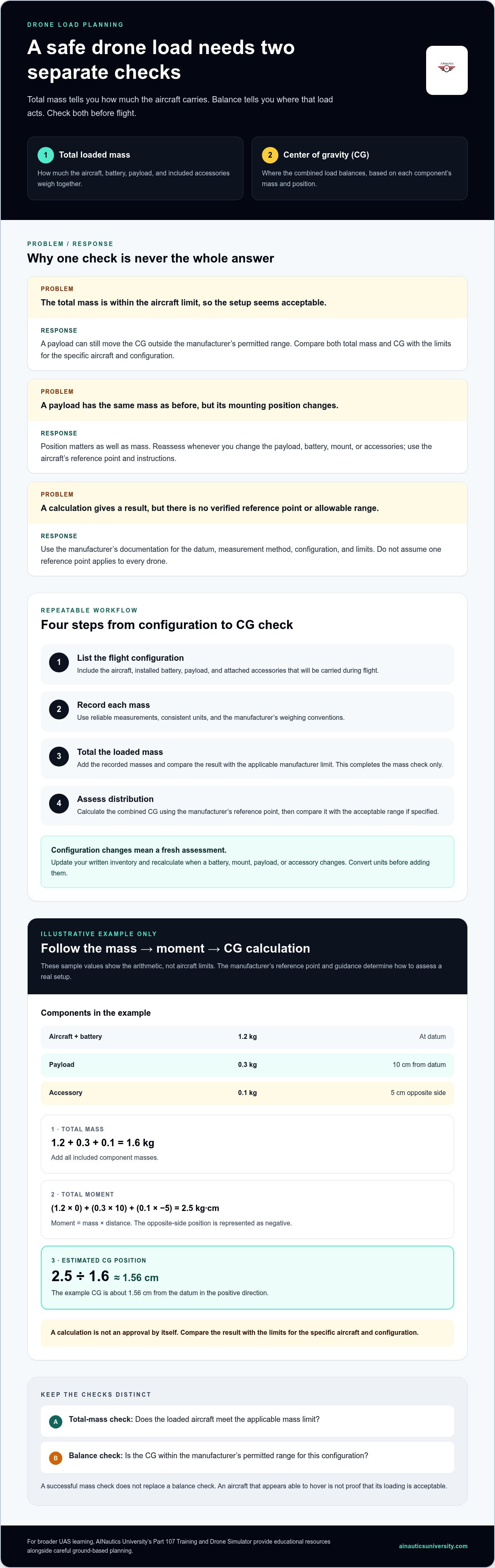
These checks are connected, but they answer different questions. A drone can be within its total-mass limit while a payload position moves the center of gravity outside the manufacturer’s permitted range. Use the aircraft’s documentation to find the relevant limits, reference points, and configuration-specific instructions.
How weight, payload, and center of gravity differ
Aircraft mass is the mass of the drone in its flight configuration, including the components the manufacturer says to count. A payload is equipment or cargo added for the mission, such as a sensor or carried item. It adds mass and changes how the combined load is distributed.
The center of gravity, often shortened to CG, is the balance point of the loaded aircraft. Its position depends on both the mass of each component and where that component sits relative to the aircraft. This follows the same center of mass physics principles used to describe how a collection of masses balances.
Consider two payloads with the same mass. Mounted in different positions, they can shift the drone’s balance by different amounts. A modest payload placed far from the aircraft’s balance point may have more influence than the same payload mounted closer to it. The acceptable position depends on the drone’s design and manufacturer guidance.
Why pilots check both loading and balance
An unsuitable load can affect stability, control, and performance. A drone may appear able to hover while its motors compensate for uneven loading, but that doesn’t establish that the configuration is acceptable. Don’t judge a payload by its mass alone.
- Check total loading: Add the relevant aircraft components and payload, then compare the result with the applicable mass limit.
- Check distribution: Assess the payload’s location using the manufacturer’s reference points, methods, and permitted CG range.
- Check the configuration: Follow instructions for the specific aircraft, battery, mount, and payload arrangement.
A successful mass check does not replace a balance check. Treat both as necessary parts of preparation, and use the manufacturer’s documentation to determine whether a particular arrangement is within limits.
How to Calculate Drone Load and Center of Gravity
Use a consistent sequence: identify the flight configuration, record each relevant mass, total the load, then assess where those masses sit. The aircraft’s documentation remains the authority for measurement conventions, reference points, and allowable limits.
- Identify the components. List the aircraft, installed battery, payload, and attached accessories in the exact configuration you plan to fly. Include items that will remain attached or be carried during flight.
- Record each mass. Use reliable measurements and consistent units. Follow the manufacturer’s conventions, including which components to include and how to configure the aircraft for weighing.
- Calculate total loaded mass. Add the recorded masses and compare the result with the applicable manufacturer limit for that configuration. A total below the limit completes only the mass check, not the balance assessment.
- Assess distribution. Use the manufacturer’s reference point and the position of each component to calculate the combined center of gravity. Compare the result with the manufacturer’s acceptable range, if specified.
Calculate total loaded mass before flight
Keep a written inventory rather than relying on memory. If you change a battery, mount, or accessory, update the list and recalculate. Don’t mix units, such as grams and kilograms, in the same total unless you convert them first. The result is meaningful only when it follows the manufacturer’s measurement method for the specific configuration.
Estimate how payload placement changes balance
A moment describes the effect of a component’s mass at a particular distance from a reference point, or datum. In a basic calculation, moment equals mass multiplied by distance. Add the component moments, then divide by total mass to find the combined center-of-gravity position. Use the reference point and coordinate direction specified for that aircraft; no single datum applies to every drone.
Illustrative example only: Suppose the aircraft and battery together have a mass of 1.2 kg at the chosen datum, a payload has a mass of 0.3 kg at 10 cm from it, and an accessory has a mass of 0.1 kg at 5 cm on the opposite side. With that side represented as negative, total mass is 1.6 kg. Total moment is (1.2 × 0) + (0.3 × 10) + (0.1 × -5), or 2.5 kg·cm. The estimated center of gravity is 2.5 ÷ 1.6, or about 1.56 cm from the datum in the positive direction.
These sample values demonstrate the arithmetic only. They are not aircraft limits, a recommended payload setup, or operational approval. A payload’s mass alone can’t show its effect on balance; its position matters too. Use the manufacturer’s reference data and permitted range when assessing an actual aircraft.
Building confidence with calculations takes practice alongside broader pilot preparation. Explore AINautics University’s Part 107 training as an educational resource for developing foundational UAS knowledge.
How to Interpret the Calculation Against Drone Limits
A calculation is useful only when you compare it with the limits for the aircraft and its exact configuration. Manufacturer guidance may set a total-mass ceiling, an acceptable center-of-gravity range, and instructions for particular batteries, payloads, or mounting arrangements. These checks are related, but they are not interchangeable.
Pilots must check both total mass and balance: meeting the aircraft’s mass limit does not confirm that the payload is positioned within its permitted center-of-gravity range.
What maximum takeoff weight can and cannot tell you
Maximum takeoff weight is the total-mass ceiling specified for an aircraft. It answers one question: does the loaded aircraft remain within that stated limit? It doesn’t tell you whether a payload is mounted in an acceptable position, nor does it establish that every configuration shares the same ceiling. Use the limit and instructions for the specific aircraft setup, not a number assumed to apply across a whole product range.
Manufacturer limits describe the aircraft’s loading and configuration boundaries. Broader operational requirements are separate. Follow the rules that apply to your operation as well as the manufacturer’s documentation; don’t treat a manufacturer limit as a complete statement of every operational requirement.
How payload changes affect performance considerations
Added mass and altered balance can affect how the aircraft performs, but the calculation alone can’t predict every flight outcome. Treat each as its own check: total mass concerns how much the aircraft carries, while center of gravity concerns the location of that load. Both must stay within the applicable manufacturer guidance.
Load factor is another distinct concept. It describes the aerodynamic load experienced during a maneuver, not the aircraft’s static payload mass or center-of-gravity position. Density altitude is also a separate performance factor; consult aircraft-specific guidance rather than folding it into a mass or balance calculation.
Use AINautics University’s Part 107 training to build broader UAS knowledge alongside disciplined loading calculations.
A Repeatable Preflight Workflow for Drone Loading Calculations
Make each loading assessment specific to one flight setup. A familiar drone may carry a different battery, sensor, mount, or accessory from one mission to the next, so calculations from an earlier configuration aren’t automatically valid. Follow the aircraft manufacturer’s method and limits, and record enough detail to make your work traceable.
Record the exact aircraft and payload configuration
Start with the aircraft model and the configuration you intend to fly. Record the battery, payload, mounting position, and attached accessories. Use consistent units throughout, and note the measurement source or method so you can repeat the assessment. Treat a changed setup as a new calculation, not a small adjustment to an old result.
Use this sequence before each flight:
- Identify the configuration. Note the aircraft model and the specific battery, payload, mount, and accessories installed.
- Check the manufacturer’s method. Find the applicable instructions, reference points, limits, and any configuration-specific conditions.
- Record component masses. Use the required measurement conventions and keep every value in the same units.
- Calculate the loaded mass and balance. Apply the manufacturer’s method to the actual configuration.
- Compare each result with its limit. Assess total mass, center-of-gravity position, and any applicable setup instructions separately.
- Document the outcome. Save the configuration details, inputs, results, and the guidance used for comparison.
Recheck, document, and resolve out-of-limit results
Recalculate after any change to the payload, battery, mounting position, or accessory set. Even if total mass changes only slightly, a different placement can change the balance calculation. Don’t assume that a previous result still applies because the aircraft looks similar or the same mission equipment is being used.
If a result exceeds a stated limit, or you can’t interpret the applicable instructions, pause the operation. Review the manufacturer’s guidance for that aircraft and configuration before proceeding. Don’t treat an estimated value or a passing mass check as a substitute for resolving an out-of-limit balance result.
Keep a clear record for each configuration. A simple table or worksheet can capture the date, aircraft model, installed components, measurement units, calculated results, applicable limits, and changes from a previous setup. This makes it easier to spot outdated assumptions and repeat a calculation accurately when the equipment changes.
Checklist summary: Identify the exact setup, measure and calculate using the manufacturer’s method, compare every result with the applicable limits, and document the outcome. This is a useful preflight routine, not a replacement for the aircraft’s instructions.
Strengthen your preparation with AINautics University’s Part 107 training as you build broader UAS knowledge alongside careful preflight habits.
Build Drone Calculation Skills Through Structured UAS Training
Accurate loading calculations are one part of responsible piloting. They depend on practical skills such as following aircraft documentation, identifying the active configuration, and making careful preflight decisions. Structured UAS education can help learners connect these habits with broader operational knowledge rather than treating calculations as isolated arithmetic.
Use Part 107 learning to strengthen pilot knowledge
Part 107 preparation provides a broader foundation for understanding pilot responsibilities and safe operations. AINautics University offers Part 107 training for students and new pilots building that knowledge. As you study, connect aircraft loading and performance concepts to the practical task of checking a real drone’s instructions before flight. Training supports preparation, but it doesn’t replace the manufacturer’s guidance for a particular aircraft or configuration.
AINautics University’s online options include the SELF-PACED Remote Pilot Certification at $49.00 with 16 modules and the AG Remote Pilot Certification at $149 with 20 modules. These are distinct course options for learners preparing for FAA Part 107 certification. Keep the focus on understanding why careful preparation matters, not just memorizing terms. The goal is to carry sound decision-making into each mission, including the discipline to pause when a loading result is unclear.
Explore simulation and educator resources
The AINautics Drone Simulator is an educational resource for developing piloting knowledge; it isn’t a tool for calculating aircraft mass or center of gravity. Scenario-based learning can give students opportunities to think through flight situations and discuss decisions in a learning environment. Use it to reinforce broader concepts, then rely on the aircraft’s documentation and your recorded calculations for actual loading decisions.
Educators can also connect foundational drone knowledge with classroom learning. A drone curriculum guide can support planning how UAS topics fit into instruction, while AINautics University’s Train-the-Teacher Program and VR Trailer Mobile Lab support educator and student learning experiences. Keep calculations grounded in the specific aircraft documentation, and use classroom discussion to help learners explain their reasoning clearly.
For students, parents, and educators, the next step is to build knowledge in a sequence: learn the operating foundations, practice thoughtful decision-making in educational settings, and apply the manufacturer’s method to the actual aircraft configuration. Developing drone pilot load balancing calculations as a consistent habit can strengthen that preparation without turning an estimate into flight approval. Always use the manufacturer’s stated limits for the aircraft.
Explore AINautics University training resources to find learning options that support your next step in UAS education.
Make Careful Preparation Your Next Step
Approach every flight with curiosity and discipline. Strong drone pilot load balancing calculations aren’t just arithmetic; they’re part of a pilot’s ability to make informed decisions, recognize uncertainty, and keep learning as aircraft and mission setups change.
Continue developing that judgment through structured learning. AINautics University offers Part 107 training and self-paced certification options, along with the AINautics Drone Simulator and scenario-based training resources. Use them to strengthen your broader UAS knowledge, while grounding aircraft-specific loading decisions in the manufacturer’s instructions.
Choose a learning path that fits your goals, whether you’re preparing for professional piloting, supporting a student, or bringing UAS concepts into the classroom. Explore AINautics University drone training resources and take your next step in UAS education.
Frequently Asked Questions
What does load balancing mean for a drone pilot?
For a drone pilot, load balancing means assessing the aircraft’s loaded mass and how that mass is positioned. It’s different from data-processing load balancing, where software distributes computing tasks. In practice, drone pilot load balancing calculations help you decide whether a physical aircraft configuration aligns with its manufacturer’s instructions. For example, changing a camera mount can alter the aircraft’s balance even if the mission and overall setup seem otherwise familiar.
How do you calculate a drone’s center of gravity?
Use the aircraft’s specified reference point, then combine each component’s mass multiplied by its distance from that point. Divide the total moment by total mass to estimate the center of gravity. For example, an inventory might include the aircraft, battery, payload, and mount, each measured in consistent units. The formula provides a position estimate, not approval to fly; use the manufacturer’s method and compare the result with its configuration-specific guidance.
Can a drone payload be safe if the total weight is below the limit?
Not necessarily. Being below a stated total-mass limit doesn’t establish that the payload is positioned acceptably. A configuration might pass the mass check but place equipment outside the aircraft’s specified balance range. It would still need attention before flight. Assess the complete setup against the manufacturer’s instructions, including relevant mounting or configuration guidance, rather than deciding from the payload’s mass or the total alone.
Do drone pilots need to recalculate balance when changing a payload?
Yes, recalculate whenever a change affects the aircraft’s loading or component positions. Replacing a sensor, moving a mount, changing the battery, or adding an accessory can make an earlier calculation no longer applicable. Record the revised setup so it’s clear which results belong to which configuration. If a change leaves you unsure how to apply the manufacturer’s method, pause and resolve that uncertainty using the aircraft’s documentation before flight.
What is the difference between maximum takeoff weight and center of gravity?
Maximum takeoff weight is the aircraft’s stated ceiling for total loaded mass; center of gravity is the position where the combined load balances relative to a reference point. One value describes how much is carried, while the other describes how the load is arranged. A configuration can satisfy the mass ceiling yet still need a balance adjustment or further review under the manufacturer’s instructions.
Is drone data load balancing the same as aircraft load balancing?
No. Aircraft load balancing deals with physical loading and the position of mass; data load balancing deals with assigning computing tasks across processing resources. The distinction matters if a search result discusses servers, data pipelines, or workload scheduling. Those methods don’t determine whether a drone’s payload is within aircraft limits. For flight preparation, use aircraft loading guidance and the manufacturer’s documentation for the specific configuration.

Article by
AINautics University Team
The team behind AINautics University, dedicated to drone education and FAA Part 107 certification prep, VR flight simulation, and STEM training programs for students and educators.


