
A drone curriculum can teach much more than flight. The ISTE drone curriculum coverage overview maps 15 distinct ISTE standard codes across 58 alignments, connecting drone topics with broader learning goals. Its scope includes technology concepts, safe operation, hands-on flight skills, and classroom applications.
It’s natural to wonder how these topics fit into a real school day, especially when teachers need a clear lesson sequence and the confidence to lead practical activities. Effective integration takes more than equipment: educators need preparation that connects technology with student learning.
Here, you’ll learn what the curriculum can include, from teacher training and paced lessons to flight skills, FAA Part 107 concepts, and classroom materials. We’ll also explore how students can build knowledge through planning, programming, and hands-on projects, so you can see how drone learning can become a structured part of STEM education.
Key Takeaways
- Connect drone concepts to STEM by using flight activities to explore weight, height, angles, and speed.
- Prepare educators with ongoing professional development so technology supports teaching and student learning.
- Use hands-on demonstrations, mission-planning projects, and reflection to assess student progress.
- Build classroom operation skills around flight mechanics, drone care, and safety-focused activities.
- Explore how Part 107 Training can support learners who want to build toward professional drone knowledge.
Beginner-level drone technology and flight skills
The ISTE drone curriculum is designed for school learners, with examples ranging from sixth-grade team activities to high school coursework. It aligns drone topics with ISTE standards and other subject areas, building understanding of drone technology, flight, safety, and practical applications.
Flight Safety and FAA Regulations
Safety belongs at the start of a school flight program, not as an afterthought. Students can learn why FAA regulations matter for legal drone use and how safe choices shape flight activities. An introductory course can use indoor lessons to explore controls and procedures before outdoor flying. Teachers should set clear expectations, supervise practice, and distinguish classroom learning from operating a drone beyond school.
Learners, Standards, and Learning Objectives
The curriculum connects drone lessons to ISTE standards and academic subject areas, helping teachers link technology with science, engineering, and creative problem-solving. Its overview includes 15 distinct ISTE standard codes and 58 alignments across subject areas. Topics include what a drone is, its history and anatomy, applications, careers, safety, and flight. Learning objectives can ask students to explain drone components, investigate uses, and apply concepts during activities.
Flight controls give beginners a practical way to connect vocabulary with movement. Thrust affects how much lift a drone produces. Pitch tilts it forward or backward, while roll tilts it side to side. Yaw turns the drone around its vertical axis. Students can predict what each input will do, make one controlled adjustment, then describe the result. For example, a small pitch change can move a drone forward, while yaw changes which direction its front faces.
Hands-on flight helps students test these ideas in a controlled sequence. Start with a simulator or stationary demonstration, then introduce basic movements and simple flight paths. Learners can plan a route using weight, height, angles, and speed as design considerations. A Drone Simulator can help students practise control choices before a physical flight activity, while a teacher observes how learners follow instructions and respond to the drone’s movement.
Beginner coding adds another layer to the course. Students can write or modify a simple program to direct a drone along a planned route, then compare the intended path with its actual movement. This links computational thinking directly to flight control. A creative challenge might ask teams to design a route around classroom markers, explain their code, and revise it after a test. The focus is on reasoning, safe participation, and learning from results, not speed.
Professional development and teacher training
Drone lessons work best when teachers connect the technology to clear learning goals. Professional development should prepare educators to teach concepts, guide practical activities, and support students as they learn through testing and revision. Buying equipment and encouraging classroom use alone doesn’t provide that preparation. Teachers need time to build technological competency and decide how drone activities support their subject areas.
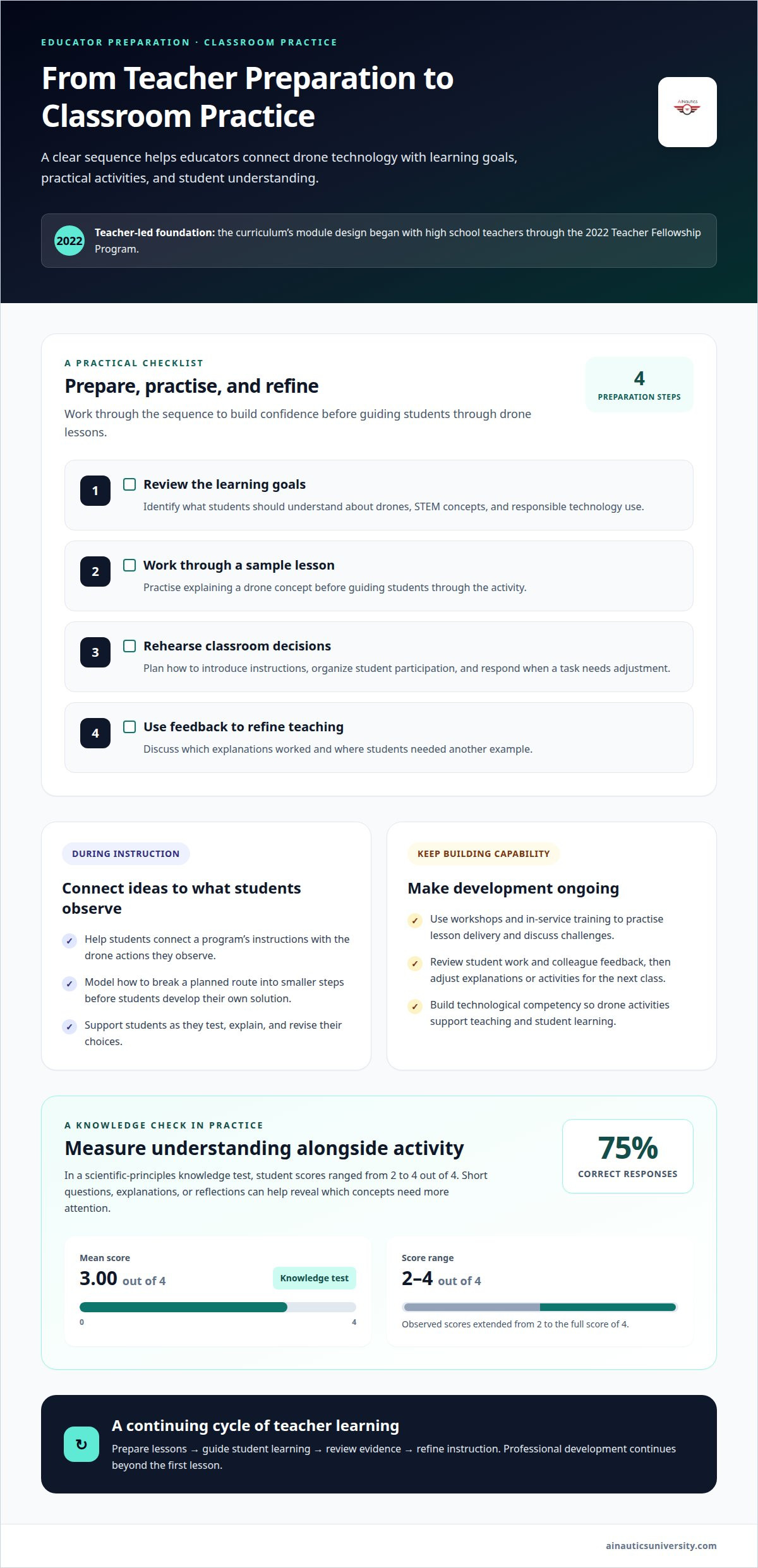
The curriculum’s module design began with high school teachers through the 2022 Teacher Fellowship Program. That teacher-led foundation matters: educators can shape lessons around classroom needs, student readiness, and realistic teaching conditions. Ongoing professional development can then help teachers adapt the material as they gain experience. Workshops and in-service training give staff opportunities to practise lesson delivery, discuss challenges, and strengthen their approach.
A useful training sequence moves from understanding to teaching practice:
- Review the learning goals. Identify what students should understand about drones, STEM concepts, and responsible technology use.
- Work through a sample lesson. Practise explaining a drone concept before guiding students through the activity.
- Rehearse classroom decisions. Plan how to introduce instructions, organize student participation, and respond when a task needs adjustment.
- Use feedback to refine teaching. Discuss which explanations worked and where students needed another example.
That preparation applies to coding, too. Teachers don’t need to turn every lesson into a programming course. Instead, educators can help students connect a program’s instructions with the actions they observe, then ask them to explain or revise their choices. For example, teachers can model how to break a route into smaller steps before students develop their own solution.
Knowledge checks help reveal what students understand, rather than simply whether they completed an activity. In a study’s scientific-principles knowledge test, scores ranged from 2 to 4 out of 4. Students achieved a mean score of 3.00, and the correct-response rate was 75%. These results offer a concrete example of checking understanding alongside hands-on learning. Teachers can use short questions, student explanations, or reflections to identify concepts that need further attention.
Professional development should continue beyond the first lesson. Teachers can review student work, share feedback with colleagues, and adjust explanations or activities for the next class. This cycle supports thoughtful technology integration and helps educators prepare students for future STEM learning. Teacher development is part of the program, not a one-time step before equipment reaches the classroom.
Schools should sustain support with ongoing professional development, including workshops and in-service training, to integrate drone technology into the classroom. Teachers need sufficient technological competency to drive pedagogical change and support student learning. Simply buying technology and urging teachers and students to use it is not enough for effective integration.
Structured lesson plans and classroom pacing
A structured drone course moves from concepts to application, giving students a clear path through classroom learning. Teachers can organize lessons around a question, a focused activity, and evidence of understanding. For example, a class might study how drones are used, plan a mission, then explain the choices behind its route. This sequence connects STEM ideas with practical problem-solving.
Plan the curriculum before choosing hardware. Schools should select their drone curriculum before purchasing equipment, so learning goals guide equipment decisions. A lesson centered on design, coding, or flight practice may call for different classroom resources. Starting with the course plan also helps educators decide which activities can happen indoors and which require a flight setting.
A useful pacing framework develops skills in stages:
- Introduce a concept. Use a diagram, case example, or discussion of a drone application to build shared understanding.
- Apply the idea. Ask students to plan a mission or solve a design challenge in small groups.
- Practise a skill. Add a hands-on demonstration or coding task that connects directly to the lesson goal.
- Reflect and revise. Have students explain their decisions, use feedback, and improve their work.
This staged approach can serve middle school learners and older students without making every lesson identical. A middle school class might map a simple route and explain its purpose. More advanced students could develop a mission plan, test a program, and revise it after reviewing the results. In each case, the teacher can adjust the task’s complexity while keeping the central learning objective consistent.
Assessment should capture both process and outcome. A flight demonstration can show whether students apply learned skills. A mission-planning project can reveal how they combine technical choices, safety considerations, and problem-solving. Technical-skill checklists help teachers record observable progress, while reflection lets students describe what they would change. Group projects also show how learners communicate and divide tasks.
Real-world problems make these activities purposeful. Students might plan how a drone could collect information for a school project, then explain what the mission needs to accomplish. The teacher can assess the plan, the reasoning behind it, and the team’s final presentation rather than judging only the flight result. Classroom applications can also connect drone learning with engineering, STEM, construction, or career exploration.
Curriculum modules were refined and expanded as a summer internship project in 2023, and the high school curriculum was ready for classroom implementation in fall 2023. These milestones reflect a progression from curriculum development toward practical classroom use. For educators, the key is to pace each course around its learning goals, available resources, and the evidence students produce at every stage.
Drone operation skills
Operation skills combine controlled flight with knowledge of how a drone works and is maintained. In the SOAR model, operation covers the mechanics of flying and maintaining a drone. Students can develop these skills in sequence: identify the parts, explain their purpose, practise a planned task, then describe how routine care supports continued use. This grounds operation in both action and understanding.
A lesson can focus on one operational decision at a time. Students might inspect a drone’s visible components and describe how each contributes to flight. Next, they can review a mission plan and identify the controls or actions needed to complete it. After practising, learners can explain what happened and how their choices affected the result. Teachers can use those explanations to assess understanding, not just completion.
Maintenance belongs alongside flight practice. Students can learn to handle equipment carefully, recognize when a component needs attention, and follow school procedures for storing and preparing it. A practical activity might ask teams to use a checklist before and after a demonstration. They can record observations, note any issues, and explain why careful handling matters for reliable operation. These habits connect technical skills with responsibility.
Operation modules can also connect with science and engineering. For example, students can predict how a planned movement will affect a drone, observe the result, and explain any difference between expectation and outcome. This process develops observation, reasoning, and problem-solving. A simulator can give learners a practice environment to explore control choices before applying their understanding in a classroom activity.
Regulations are part of understanding the conditions around a flight. Students should recognize that safe, responsible drone use involves following applicable rules, not simply controlling the aircraft. A mission-planning exercise can ask learners to identify the purpose of a flight, its setting, and the considerations that shape a responsible plan. This puts operational decisions in context rather than treating flying as an isolated technical task.
These capabilities also introduce students to careers in uncrewed systems. The curriculum’s Careers in Uncrewed Systems topic covers eight distinct standards across three subject areas. Teachers can use this connection to help learners see how drone operation relates to roles beyond school. Students might compare an operator’s tasks in scientific research, construction, or emergency response, then identify the skills each example requires.
Assess progress through observable actions and reflection. A student can demonstrate a planned operation, describe relevant equipment, and explain a maintenance step. A team can present its mission choices and discuss how regulations inform responsible use. This evidence shows whether learners can apply operational knowledge, communicate decisions, and connect classroom practice with real-world uses.
Curriculum licenses and included materials
Teachers can implement an ISTE-aligned drone curriculum by selecting topics, matching them to course goals, and sequencing instruction from concepts to student activities. The written license defines permitted access to and use of the materials, so educators should understand its terms before planning classroom use.
Separate the teaching plan from the license. A curriculum may describe learning objectives, subject connections, or classroom activities, while its license explains how educators may use the materials. Don’t assume a license automatically permits sharing files across a school, adapting lessons, or reproducing resources. Those permissions depend on the terms provided.
Before integrating materials into instruction, review these practical points:
- Authorized users: Identify whether access is granted to one educator, a department, or a wider school group.
- Classroom use: Clarify whether teachers may display materials, distribute copies, or use them with multiple classes.
- Adaptation: Determine whether educators can adjust examples for grade level, subject, or available equipment.
- Sharing and storage: Understand whether materials may be placed in a learning platform or shared with colleagues.
Then inventory the instructional resources available for each lesson. For a mission-planning activity, educators might need a clear objective, student instructions, a way to record decisions, and an assessment method. For an engineering task, they might map the concepts students will apply and identify evidence of learning. This is a planning framework, not a claim that every curriculum package includes these specific items.
Implementation can begin with a focused module rather than a full course. Choose one topic, such as drone applications or safety, connect it to an existing unit, and identify the activity students will complete. An introductory lesson can take place indoors, allowing educators to start with concepts and classroom instruction before considering flight activities. Align each resource with the lesson goal so materials support learning rather than add tasks without a clear purpose.
Schools should also decide how educators will coordinate access and use. A department lead can document which teachers use the materials, where shared resources are stored, and how adaptations are handled under the license. That simple process helps keep instruction consistent across classes while allowing teachers to tailor examples to students’ needs. A teacher-training pathway for drone education can help educators prepare to put those lessons into practice.
Educators should adapt lessons only as the license permits and keep a record of approved changes. Administrators can also distinguish instructional files from promotional uses. For example, school administrators may use drones to create marketing materials for YouTube channels and websites, showing school grounds from above.
The ISTE 2016 conference program included 1,000-plus sessions led by educators and vendors, as well as about three-dozen workshops, panels, and posters focused on the K-12 maker movement. The dancing drone curriculum includes entry for One team to compete in the Dancing Drone Competition. These examples can prompt administrators to check whether a package includes competition access, classroom content, or resources for school communication, and to make those distinctions clear before materials are assigned or distributed.
AINautics University: Part 107 Training
AINautics University offers Part 107 Training for learners building knowledge of professional drone operations. Educators preparing to bring UAS topics into class can explore the Train-the-Teacher Program, while Self-Paced Certification supports learners who prefer independent study. The VR Trailer Mobile Lab offers another way to engage students with drone education.
Choose the next step based on your goal: prepare to teach, study toward certification, or bring an immersive learning experience to students. These programs complement classroom curriculum with focused training and learning opportunities. Contact AINautics University to discuss which option best fits your educational or certification goals.
Turn classroom interest into a clear next step
Drone education can help students connect classroom learning with skills they may carry into future study and work. An ISTE drone curriculum creates a foundation, while each school’s next step depends on its goals: preparing educators to teach, helping learners pursue certification, or bringing drone experiences into student programming.
AINautics University offers Part 107 Training for learners developing professional knowledge, a Train-the-Teacher Program for educators, and a VR Trailer Mobile Lab for hands-on learning experiences. These options can support different stages of a school’s UAS journey, from teacher readiness to student engagement.
Choose the direction that best fits your learners and educational goals, then connect with AINautics University to discuss a path forward. Every strong program begins with a purposeful next step, and your classroom can build from there.
Frequently Asked Questions
What is the ISTE drone curriculum?
Drone-related learning gives students a way to practise technology skills in an academic setting. Teachers can start with a learning goal, choose a drone scenario that makes it concrete, and decide what student work will demonstrate understanding. For example, students might create an annotated explanation of how a drone application supports a community need, then identify the technology choices behind it.
What drone activities and lesson plans are included?
Activities can be adapted to different subjects and class goals. A digital citizenship lesson might ask students to discuss responsible image sharing after a drone records a school event. In an engineering task, teams could sketch a drone design for a defined purpose and explain their choices. Educators can build instruction around the question, student task, and evidence of learning, then adjust the complexity for their class.
What equipment and software are required for the ISTE drone curriculum?
Requirements depend on whether a lesson focuses on research, coding, simulation, or physical flight. Plan in categories: teaching materials to introduce concepts, a suitable device and coding environment for programming activities, and a simulator or drone when practice calls for one. Match each resource to the learning objective before selecting equipment. This helps schools avoid buying hardware that a planned lesson doesn’t need.
What safety, privacy, and FAA rules apply to drones used in U.S. schools?
Before a planned flight, identify applicable FAA requirements and establish who approves the operation. School procedures should also define where students may record, who can access the files, and how images or video may be shared. For instance, a class documenting a school project can agree on recording boundaries and file handling before collecting footage. These steps make safety and privacy part of lesson planning.

Article by
AINautics University Team
The team behind AINautics University, dedicated to drone education and FAA Part 107 certification prep, VR flight simulation, and STEM training programs for students and educators.


