
The most elite pilots in the 2026 drone industry don't start their careers in the field. They begin in the virtual world. It's natural to feel a surge of anxiety when you're holding expensive hardware and preparing for your first takeoff. You might even feel confused by the difference between recreational gaming and professional drone simulator training. Mastery begins in a high-fidelity environment where mistakes are free and skills are measurable.
We understand that you want a clear roadmap from being a curious learner to a certified professional. This guide provides a structured approach to bridging that gap. You'll learn how to select software that aligns with FAA standards and how virtual practice leads directly to Part 107 success. We're here to help you move past the fear of hardware damage and into a state of total flight readiness.
We'll examine how the AINautics Drone Simulator serves as a cornerstone for our UAS Student Scholars and those pursuing Self-Paced Certification. This article breaks down the essential software requirements and training milestones that define a modern UAS career. By the end, you'll know exactly how to track your progress and determine when you're truly ready for professional flight operations.
Key Takeaways
- Understand why professional drone simulator training is the most cost-effective way to build muscle memory without risking expensive hardware.
- Identify the specific hardware and software configurations required to mirror real-world flight physics for 2026 industry standards.
- Follow a structured, two-phase training progression that moves from basic orientation drills to advanced precision maneuvering.
- Learn how educators can integrate the VR Trailer Mobile Lab and Train-the-Teacher Program to scale UAS education in the classroom.
- Determine exactly when you're ready to bridge the gap between virtual practice and earning your FAA Part 107 certification.
Why Simulator Training is the Foundation of Professional UAS Careers
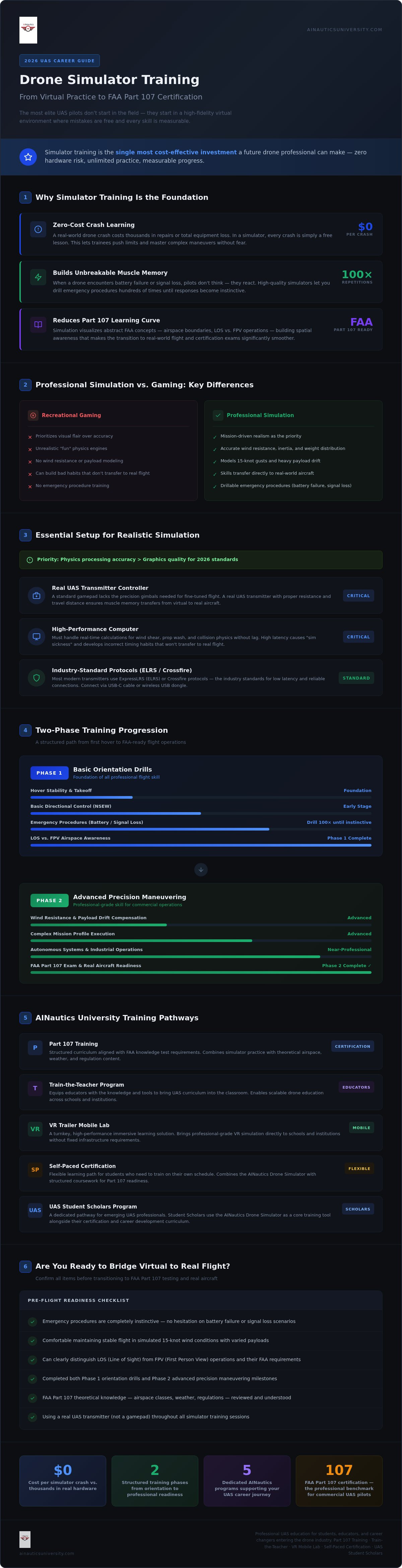
Professional drone simulator training is the starting point for every serious pilot in 2026. It isn't just a flight game or a casual hobby; it's a high-fidelity environment where you build the skills necessary for a high-stakes career. While recreational apps focus on visual flair, professional simulation focuses on the rigorous demands of the field. You're not just flying for fun; you're developing the technical proficiency required for advanced autonomous systems training and industrial operations.
The economic advantage of virtual practice is undeniable. A single mistake with a commercial drone can cost thousands of dollars in hardware repairs or lead to total equipment loss. In a simulator, a crash is simply a lesson learned at zero cost. This safety net allows UAS Student Scholars and trainees to push their limits and master complex maneuvers without the paralyzing fear of damaging expensive assets. It's a risk-free workspace where failure is a productive part of the learning process.
Mastery depends on muscle memory. When a drone encounters a sudden battery failure or a lost signal, a pilot doesn't have time to think; they must react. High-quality simulators allow you to drill these emergency procedures hundreds of times until they become second nature. This level of preparation ensures that when you transition to real aircraft, you're calm, controlled, and ready for any scenario.
The Role of Physics in Professional Simulation
Gaming physics often prioritize "fun" over "fact," which can actually hinder your development as a pilot. Professional tools like the AINautics Drone Simulator prioritize mission-driven realism. This means modeling wind resistance, weight distribution, and inertia with extreme accuracy. If you don't feel the "drift" of a heavy payload or the struggle against a 15-knot gust in your sim, you aren't truly training. We focus on these details because they are the variables you'll face every day in a commercial UAS career.
Reducing the Learning Curve for FAA Certification
Simulation is a powerful tool for visualizing the abstract concepts found in Part 107 drone training. It helps you understand complex airspace boundaries and the critical difference between Line of Sight (LOS) and First Person View (FPV) operations. By practicing these maneuvers virtually, you build a spatial awareness that makes the transition to real-world flight significantly smoother. Whether you're using our Self-Paced Certification options or attending a session in the VR Trailer Mobile Lab, simulation provides the context you need to succeed on your certification exam and beyond.
Choosing Your Setup: Essential Software and Hardware for Realistic Simulation
Success in drone simulator training starts with your interface. A standard gamepad might work for video games, but it lacks the precision needed for professional flight. You need a real UAS transmitter. These devices use specialized gimbals that offer the resistance and travel distance required for fine-tuned maneuvers. Using a real controller ensures that the muscle memory you build in the virtual world translates perfectly to your real-world aircraft.
Your computer is the engine of your training. While high-end graphics are helpful for immersion, physics processing is the priority for 2026 standards. Your system must handle real-time calculations for wind shear, prop wash, and collision physics without lag. High latency can lead to "sim sickness" or, worse, the development of incorrect timing that won't translate to the field. If you're an educator looking to bring this technology to your school, our VR Trailer Mobile Lab provides a turnkey solution for immersive, high-performance learning.
Hardware Requirements for Aspiring Pilots
Compatibility is key when selecting your gear. Most modern transmitters use protocols like ELRS (ExpressLRS) or Crossfire. These systems are industry standards because they offer low latency and reliable connections. Connecting to your PC is usually done via a simple USB-C cable or a wireless USB dongle. While many commercial pilots prefer high-resolution monitors to mimic a ground station, those interested in specialized inspections often use FPV goggles for total immersion. Choose the hardware that matches your intended career path.
Software Selection Criteria
Not all software is created equal. You must distinguish between FPV racing simulators and mission-driven commercial tools. For a professional career path, look for software that includes scenario-based modules, such as bridge inspections or search and rescue operations. It's also vital to find programs with environmental controls to practice in rain, fog, or high-wind conditions. These variables prepare you for the unpredictability of outdoor flight.
Our Self-Paced Certification modules are designed specifically to meet these professional criteria. They provide a structured environment where you can practice the exact maneuvers required for commercial success. These tools often include integrated progress tracking to measure your improvement over time. Choosing software with a built-in curriculum ensures you aren't just flying in circles; you're following a path that leads to certification and a career as a UAS Student Scholar.
How to Master Drone Flight: A Step-by-Step Training Progression
Effective flight training isn't about aimless wandering in a virtual sky. It's a disciplined progression that builds confidence through measurable repetition. You don't just jump into complex maneuvers; you follow a roadmap that mirrors professional pilot development. A structured approach to drone simulator training ensures that every hour spent behind the controller translates into real-world proficiency.
This journey moves through four distinct phases. First, you master orientation and basic hovering. Next, you develop precision maneuvering and altitude control. Once the fundamentals are second nature, you transition to mission-specific tasks like mapping or inspection. Finally, you use the simulator to practice emergency management. This zero-risk environment is the only place where you can safely experience a total motor failure or a sudden loss of signal without consequence.
The Fundamental Drills for New Pilots
Start with the basics. The "Square" and "Circle" drills are essential for understanding how your drone moves through space. One of the most difficult hurdles for new pilots is the "Nose-In" hover. When the drone is facing you, the controls are reversed. Mastering this orientation in a simulator prevents the panic that often leads to crashes in the field.
Once you've conquered orientation, move to the Figure-Eight. This drill is the gold standard for developing coordinated turns. It requires you to use both control sticks simultaneously to maintain a smooth, consistent path. You should also focus on landing precision. Don't just land anywhere; pick a specific target and practice hitting it while the simulator introduces varying wind conditions. These foundational skills are the building blocks for every professional UAS career.
Advanced Mission Scenarios
After you've mastered the sticks, it's time to put your skills to work. Professional pilots are rarely just "flying"; they're performing a task. Use the AINautics Drone Simulator to practice vertical structure inspections on cell towers and wind turbines. These scenarios require you to maintain a precise distance from an object while managing camera angles and wind gusts. It's a high-level skill that's much easier to learn virtually before attempting it on a multi-thousand dollar asset.
You can also practice orthomosaic flight paths for mapping missions. While much of this is automated in the field, understanding how to manually recover or adjust a path is vital for safety. For educators and students, scenario-based group training allows for collaborative problem-solving. Whether you're a UAS Student Scholar or an individual pilot, these advanced modules turn you from a "flyer" into a "mission specialist."
Implementing Simulation in Schools: From Classroom PCs to VR Mobile Labs
Integrating technology into the classroom requires more than just purchasing hardware. A successful drone curriculum for educators must prioritize virtual flight as the primary learning vehicle. Schools face unique challenges, such as limited outdoor space and the high cost of equipment maintenance. By making drone simulator training the centerpiece of the program, districts can offer every student hands-on experience without the logistical hurdles of managing a physical fleet in a crowded classroom.
Scaling up to accommodate 20 or more students requires a modular approach. A well-equipped drone lab typically utilizes high-performance PCs paired with professional-grade controllers. This setup allows an entire class to practice maneuvers simultaneously, providing a level of engagement that rotating through a single physical drone simply cannot match. To ensure these programs are effective, our Train-the-Teacher Program empowers educators with the technical skills and pedagogical strategies needed to lead simulation sessions with confidence.
Standardizing UAS Education for K-12
Standardization is the key to creating a sustainable program. Educators should align their simulator hours with state Career and Technical Education (CTE) pathways to ensure students receive proper credit for their work. We recommend a 90-day program launch strategy that moves students from basic theory to advanced virtual flight. High-achieving students can join the UAS Student Scholars program, which recognizes excellence in both virtual and real-world flight operations. This structure provides a clear path for students to move from the classroom to a professional career.
The Impact of Immersive VR Technology
Virtual Reality (VR) takes simulation a step further by providing unparalleled depth perception and situational awareness. In a traditional 2D simulator, judging distance from a vertical structure can be difficult. VR places the student inside the environment, allowing them to look around and sense the scale of the aircraft. This immersion is a powerful workforce development tool, as it mimics the psychological pressure and spatial requirements of real-world missions.
The AINautics VR Trailer Mobile Lab solves space constraints by bringing a high-tech flight line directly to the school district. It provides a dedicated environment for immersive learning that can be shared across multiple campuses. This mobile lab serves as a bridge, allowing students to master complex maneuvers in a controlled, high-fidelity setting before they ever step onto a real airfield. If you are ready to modernize your district's technology offerings, explore how to bring the VR Trailer Mobile Lab to your school.
Beyond the Screen: Transitioning from Simulator to FAA Part 107 Certification
The transition from virtual flight to commercial operations is the most critical phase of your development. You've spent hours in drone simulator training; now it's time to apply that muscle memory to a professional career. Knowing when you're "ready" for real-world flight isn't a guessing game. It's a measurable milestone. We look for total control during high-wind simulations and 100% accuracy in emergency resets before recommending a move to physical hardware.
Your first 10 hours on real hardware should feel like a confirmation, not a discovery. Because you've already mastered the physics of flight in the AINautics Drone Simulator, your focus can shift from "how to fly" to "how to manage the mission." This transition period is about validating your virtual skills under real atmospheric conditions. It's the moment where your investment in simulation pays off; you'll fly with a level of composure that untrained pilots simply don't possess.
Validating Your Skills through Certification
AINautics University integrates simulation directly into our Part 107 Training. We use a "Check-Ride" protocol where you must prove virtual mastery to an instructor before moving toward your FAA exam. This ensures you understand the practical application of airspace rules and safety procedures. Once you've secured your Remote Pilot Certificate from the FAA, you aren't just a hobbyist. You're a licensed professional ready for the workforce. Our Self-Paced Certification options allow you to reach this goal on a timeline that fits your academic or professional schedule.
Building a Professional Pilot Portfolio
In 2026, the industry views simulator hours as a legitimate part of a pilot's logbook. Don't stop practicing once you have your license. Professional pilots return to the simulator to prepare for specialized fields like wildlife-aware inspections or complex urban mapping. These high-stakes environments require precision that is best refined virtually first.
After certification, you can join the iFlyDrone marketplace to connect with agencies looking for skilled pilots. This nationwide workforce marketplace is where your training meets opportunity. By staying active in the AINautics community, you'll remain ahead of 2026 industry trends and regulatory changes. Whether you're a UAS Student Scholar or a seasoned veteran, the simulator remains your most valuable tool for lifelong skill maintenance and career growth.
Take Command of Your Future in the UAS Industry
The path to becoming a professional pilot is no longer defined by the risk of crashing expensive equipment. It's defined by the precision you develop through structured drone simulator training. By mastering the fundamentals in a virtual environment, you build the confidence and situational awareness required for high-stakes missions. This virtual foundation ensures that when you finally step onto the flight line, you're prepared for any scenario.
AINautics University is a Service-Disabled Veteran-Owned Small Business (SDVOSB) dedicated to providing a STEM-aligned curriculum that meets the evolving demands of the workforce. From our mobile labs to our self-paced certification options, we provide the complete ecosystem you need to succeed. Once you've earned your FAA Remote Pilot Certificate, our nationwide pilot marketplace, iFlyDrone, helps you turn your technical mastery into a professional career.
Don't wait for the perfect weather to begin your journey. You have the power to build your professional portfolio and refine your skills from your own desk starting right now. Start your flight journey with AINautics University’s Drone Simulator. Your future in the sky is waiting.
Frequently Asked Questions
Do drone simulators actually help with real-world flying?
Yes, simulators are essential for developing the muscle memory required for safe operations. They allow you to practice emergency procedures and orientation without the risk of hardware damage. By the time you transition to a real aircraft, the controls feel familiar and your reactions are instinctive. This preparation is a foundational step in the "Learn, Train, Certify, Fly" pipeline we emphasize at AINautics University.
Can I use a regular gaming controller for drone simulator training?
You should avoid using standard gaming controllers for professional development. Gamepads have shorter stick travel and lack the precise gimbal resistance found on a real UAS transmitter. Using a professional radio ensures that the physical habits you develop during drone simulator training transfer accurately to commercial hardware. This precision is vital for executing the complex maneuvers required in industrial missions.
What is the best drone simulator for FAA Part 107 preparation?
The best simulator is one that prioritizes mission-driven realism over gaming physics. For those pursuing FAA Part 107 certification, the AINautics Drone Simulator is specifically designed to bridge the gap between virtual practice and professional standards. It includes scenarios that help you visualize airspace concepts and practice the precision maneuvers often required during the "check-ride" phase of our Part 107 Training program.
How many hours should I spend in a simulator before flying a real drone?
We recommend at least 10 to 20 hours of structured simulator time before your first real flight. Aim for mastery of specific drills, such as the "Square" and "Circle" maneuvers, rather than just casual flying. You are ready when you can consistently execute landing procedures and emergency resets in high-wind conditions. Our Self-Paced Certification modules help you track these hours and ensure every minute contributes to your flight readiness.
Do I need a powerful gaming computer to run a drone simulator in 2026?
You don't necessarily need a top-tier gaming rig, but your computer must handle complex physics processing. In 2026, simulators require stable frame rates to prevent latency, which can cause motion sickness or poor timing habits. While high-end graphics cards are nice for immersion, a solid processor and sufficient RAM are more important for accurate wind and inertia modeling. Our VR Trailer Mobile Lab provides a high-performance alternative for schools without dedicated computer labs.
Are there free drone simulators for beginners?
Several free options exist for basic orientation, but they often lack the advanced physics modeling needed for professional training. Beginners can use them to understand basic stick movements, but we suggest moving to a high-fidelity simulator for commercial preparation. Professional tools provide the mission-specific scenarios and environmental variables that free versions typically omit. These advanced features are essential for anyone aspiring to become a UAS Student Scholar.
Can I use a VR headset with my drone simulator training?
Yes, integrating a VR headset significantly enhances depth perception and situational awareness. Immersive technology allows you to sense the scale of vertical structures and judge distances more accurately than on a flat monitor. This is particularly useful for specialized inspection training. We utilize this technology in our VR Trailer Mobile Lab to provide students with the most realistic drone simulator training experience possible before they handle real-world assets.
How do schools integrate drone simulators into their STEM curriculum?
Schools integrate simulation by setting up dedicated labs where entire classes can practice simultaneously. This approach aligns with state Career and Technical Education (CTE) pathways and provides a scalable way to teach UAS skills. By using the Train-the-Teacher Program, educators learn how to manage these labs and guide students through a structured flight progression. This ensures the curriculum remains actionable and directly leads to workforce opportunities after graduation.

Article by
AINautics University Team
The team behind AINautics University, dedicated to drone education and FAA Part 107 certification prep, VR flight simulation, and STEM training programs for students and educators.


